
- v1.0.0-latest-prod
Broadleaf Commerce currently offers integration with Chase Payment through a commercial integration module. To obtain this third party integration or if you have any questions about this module, please contact us at info@broadleafcommerce.org
This integration requires Broadleaf Release Train 2.3.0 or higher, esp. to include PaymentGatewayCommon 2.0.5 & PaymentTransactionServices 2.0.9.
Please review the Environment Setup article to learn how to set up a Chase Payment project, which will allow you to configure and access Chase Payment.
Chase Payment Solutions comprises a variety of systems and features, and this module primarily integrates with the Chase Orbital Gateway and Chase Hosted Payment Solution (HPS) offerings. The details about these offerings are more thoroughly explained in Chase’s official Developer Center documentation.
This is the actual payment gateway, which exposes a JSON API that can be used to submit transaction execution requests. The actual authorization and settlement platform the gateway uses behind the scenes is expected to be Stratus, which is primarily used for Card-Not-Present (CNP) eCommerce transactions.
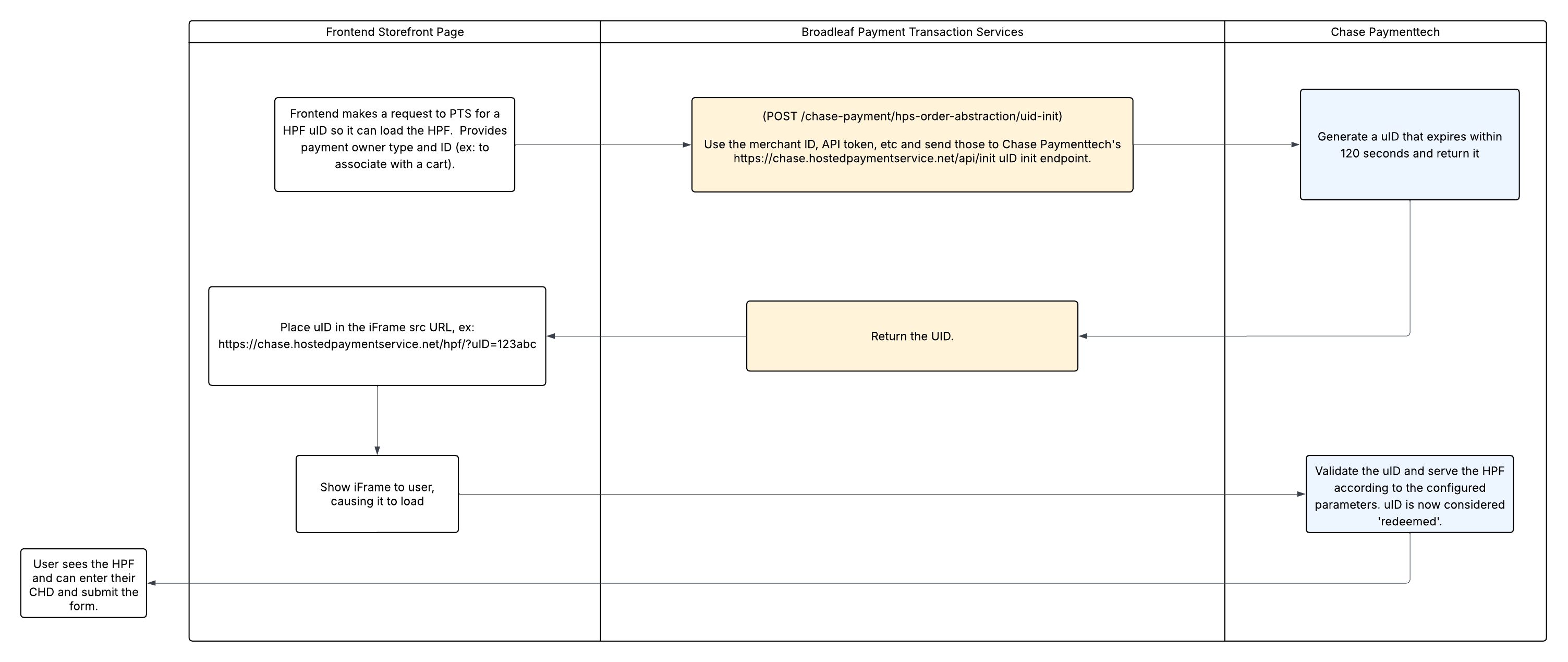
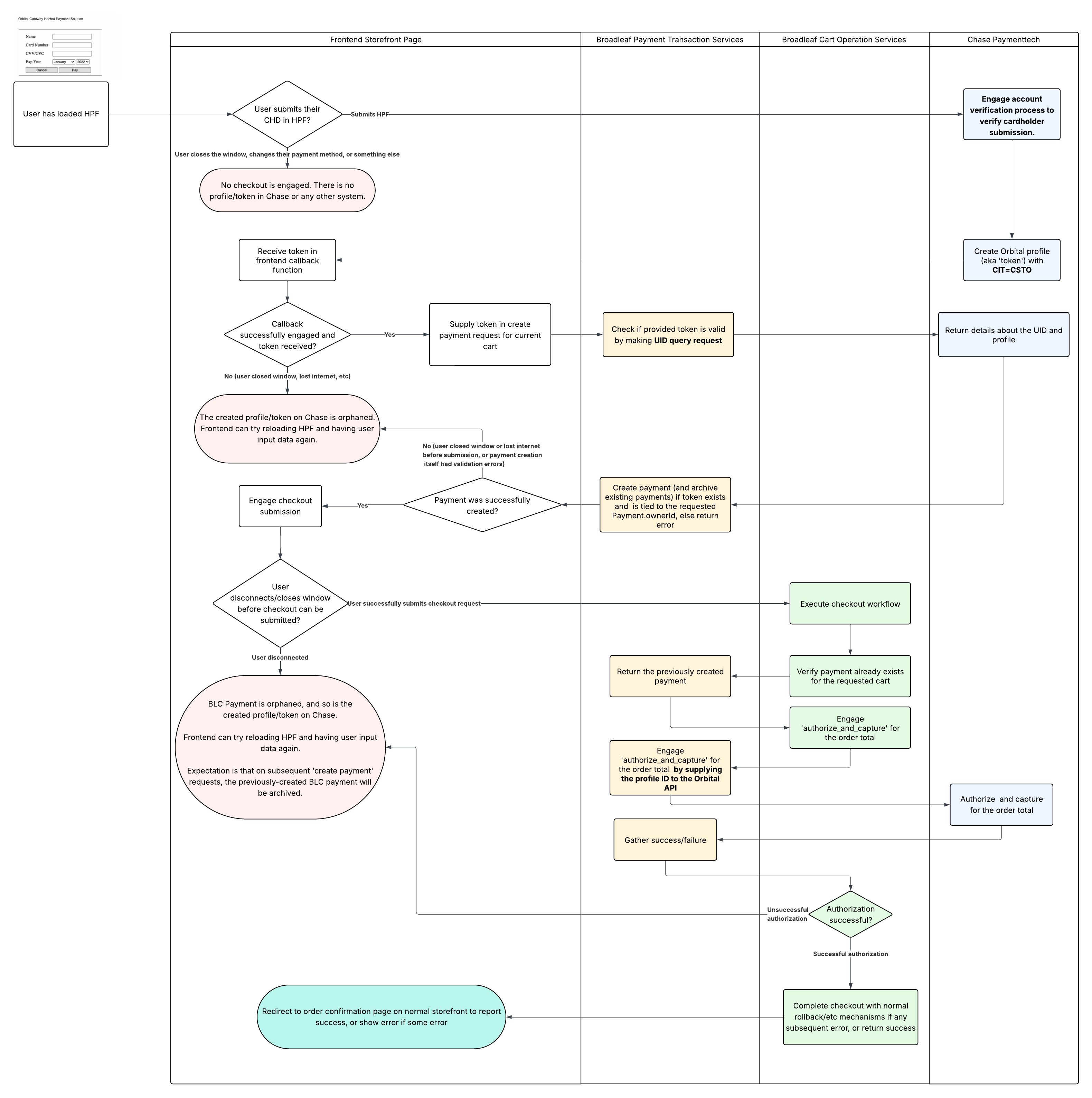
This module has integrations with Chase’s Hosted Payment Solution (HPS) offering, version 3.0. With HPS, customers can submit their sensitive cardholder data directly into a Chase-hosted form or page to create an Orbital 'profile'. The created profile’s 'customer reference number' is the only piece of information stored in Broadleaf, thereby reducing PCI scope. The profile’s customer reference number is submitted in transaction requests to the Orbital API, which looks up the contained cardholder details and executes the operation.
The Chase Payment integration generally mirrors our typical payment gateway integration pattern, but with a few key differences.
|
Important
|
HPS allows implementations to execute full payment transactions upon the customer submitting the HPF. For example, you can configure the system to automatically execute an authorization transaction for the full order total upon HPF submission. However, Broadleaf strongly recommends against this approach in favor of just engaging 'account verification' upon submission. This is because it is significantly more complex and brittle to track the lifecycle of externally executed transactions. Furthermore, Chase does not provide backend-to-backend webhooks to track the success/failure of these transactions, reducing how reliably our system can be notified of the result. By only engaging the 'account verification' flow, you still gain the benefit of proving that the submitted data is valid, but without needing to be concerned about tracking the lifecycle of any external transaction. |
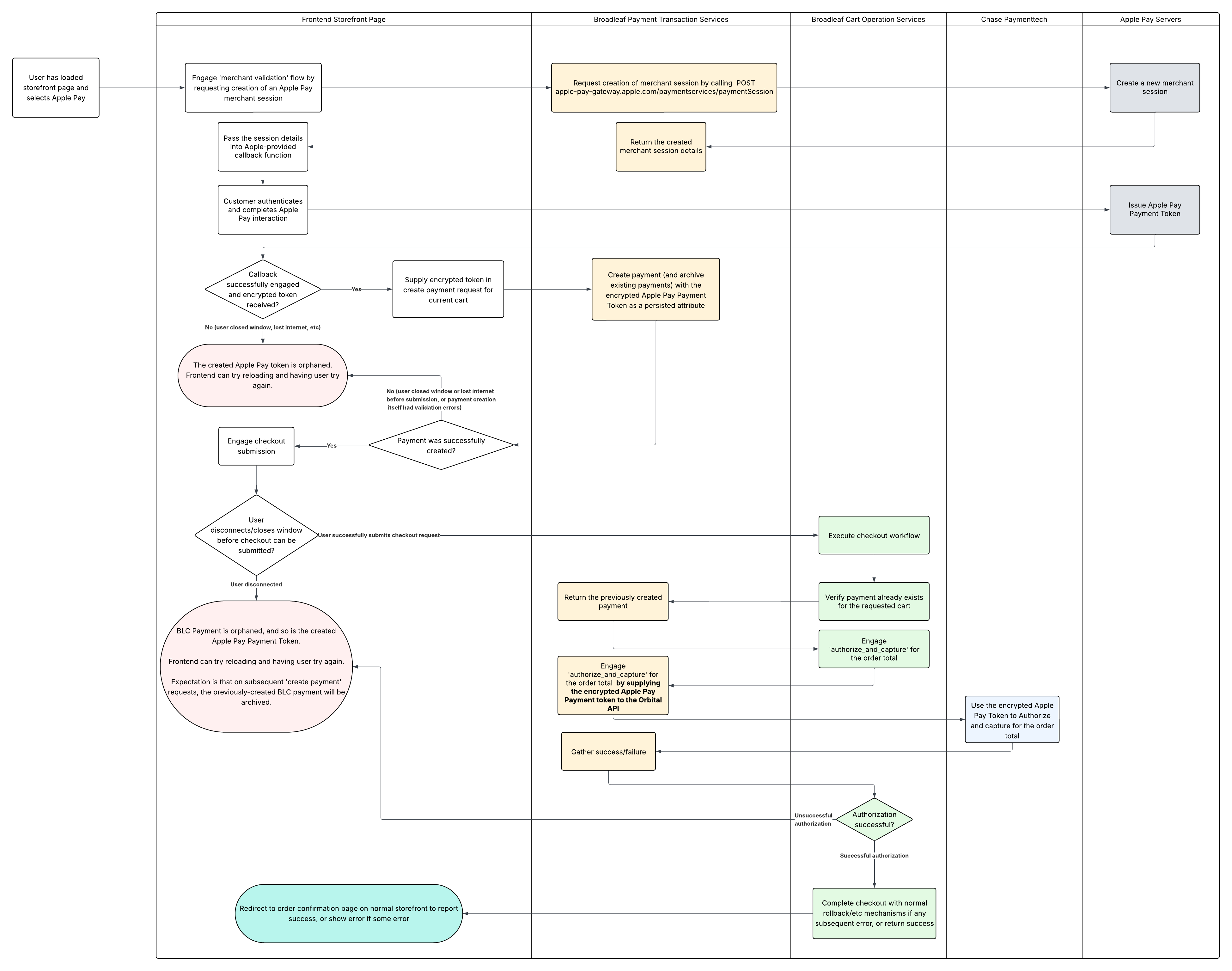
For further details on the Apple Pay Checkout flow, see the Apple Pay documentation which includes a detailed breakdown of the steps outlined in the diagram above.
export const ChasePaymentForm: FC<Props> = ({
  ...
}) => {
  const { chaseUidUrl, loading, ready, error } = useChaseHpf(...);

  return (
    <section className="flex flex-col gap-4">
      {chaseUidUrl && ready && (
        // Loads HPF in iframe with the UID URL
        <iframe
          id="chase-hpf-iframe"
          className="..."
          src={chaseUidUrl}
          referrerPolicy="strict-origin-when-cross-origin"
        />
      )}
    </section>
  );
};

export const useChaseHpf = (...) => {
  // Calls Broadleaf Chase Payment Module to initialize the UID for the form
  const { chaseUidUrl, loading } = useChaseUid();
  const completePayment = useCallback(
    async (data: PaymentCompletionResponse) => {
      const request: CreatePaymentRequest = {
        name: "Credit Card",
        type: DefaultPaymentType.CREDIT_CARD,
        gatewayType: PaymentGatewayType.CHASE_ORBITAL,
        amount: cart?.cartPricing?.total ?? { amount: 0, currency: "USD" },
        paymentMethodProperties: {
          paymentInstrumentType: "CREATED_HPS_PROFILE",
          hpsUid: data.uid
        },
        ...
      };

      // Creates a payment in PaymentTransactionService during HPF completePayment callback
      await submitCreatePaymentRequest(createPaymentRequest);
    },
    [
      cart?.cartPricing?.total,
      ...
      submitCreatePaymentRequest,
    ],
  );

  const hpfReady = useCallback(() => {
    setReady(true);
  }, []);

  useEffect(() => {
    const hpfScript = document.getElementById("chase-hpf-script");
    const hpfIsReady = typeof window.hpfReady === "function";
    if (hpfScript && hpfIsReady) {
      setReady(true);
      return;
    }

    attachCallbacks({
      handlePaymentErrors,
      handleTransactionErrors,
      completePayment,
      hpfReady,
      scrollRelay,
      startPayment,
      cancelPayment,
    });

    if (hpfScript) {
      return;
    }
    // Dynamically inject the Chase HPF script after handlers are set
    const script = document.createElement("script");
    script.src = chaseScriptSrc;
    script.id = "chase-hpf-script";
    script.async = true;
    script.onerror = (e) => {
      logger.error("Failed to load Chase HPF script.", e);
    };
    script.onload = () => {
      hpfReady();
    };
    document.body.appendChild(script);
  }, [
    cancelPayment,
    chaseScriptSrc,
    completePayment,
    handlePaymentErrors,
    handleTransactionErrors,
    hpfReady,
    scrollRelay,
    startPayment,
  ]);

  return { chaseUidUrl, ready, error, loading };
}


export const useChaseUid = () => {
  ...
  const makeRequest = useCallback(async () => {
    if (!cartId) {
      return;
    }
    try {
      setLoading(true);

      // Calls uid-init endpoint in Chase Payment Module
      const response: BroadleafHPSOrderAbstractionInitResponse =
        await getUid(appState);
      const url = new URL(response.hpsBaseRequestUrl);
      url.searchParams.set("uid", response.uid);
      setChaseUidUrl(url.toString());
    } catch (error) {
      logger.error("Error fetching Chase UID:", error);
    } finally {
      setLoading(false);
    }
  }, [appState, cartId]);

  useEffect(() => {
    if (cartId) {
      makeRequest();
    }
  }, [cartId, makeRequest]);

  return { chaseUidUrl, loading, refetch: makeRequest };
}Using this library, you can execute the following types of transactions:
Authorize
Reverse Authorize
Authorize and Capture
Capture
Refund
Regardless of whether the initial transaction (ex: Authorize, or Authorize and Capture) is executed with an HPS-created profile or with Apple Pay, all subsequent transactions (i.e. ReverseAuthorize, Capture, & Refund) are executed using the txRefNum returned by the Orbital Gateway in API responses.