
- v1.0.0-latest-prod
In order to use Chase Payment Solutions, first contact Chase to provision a new project and obtain Developer Center access.
At a high level, the steps enumerated below are required. Chase will assign you a technical representative to coordinate and assist you with this process.
Provision a new Developer Center project
Complete the Technical Profile Questionnaire (TPQ) to enumerate the list of Chase Payment Solutions features you want to leverage in your application.
Once the TPQ is established, Chase will generate test cases that you must pass before your solution can be certified. You will be granted a test MID and test API credentials as well.
You will need to configure certain behaviors in the Chase-managed portals. For example, when using Hosted Payment Solutions (HPS), you will need to configure the HPS form/page as well as settings like authorized domains. You will also need to configure Merchant Selectable Responses (MSR) in the Orbital Virtual Terminal.
After you have completed the integration and are passing all test cases, your solution will be deemed certified and you will receive production credentials.
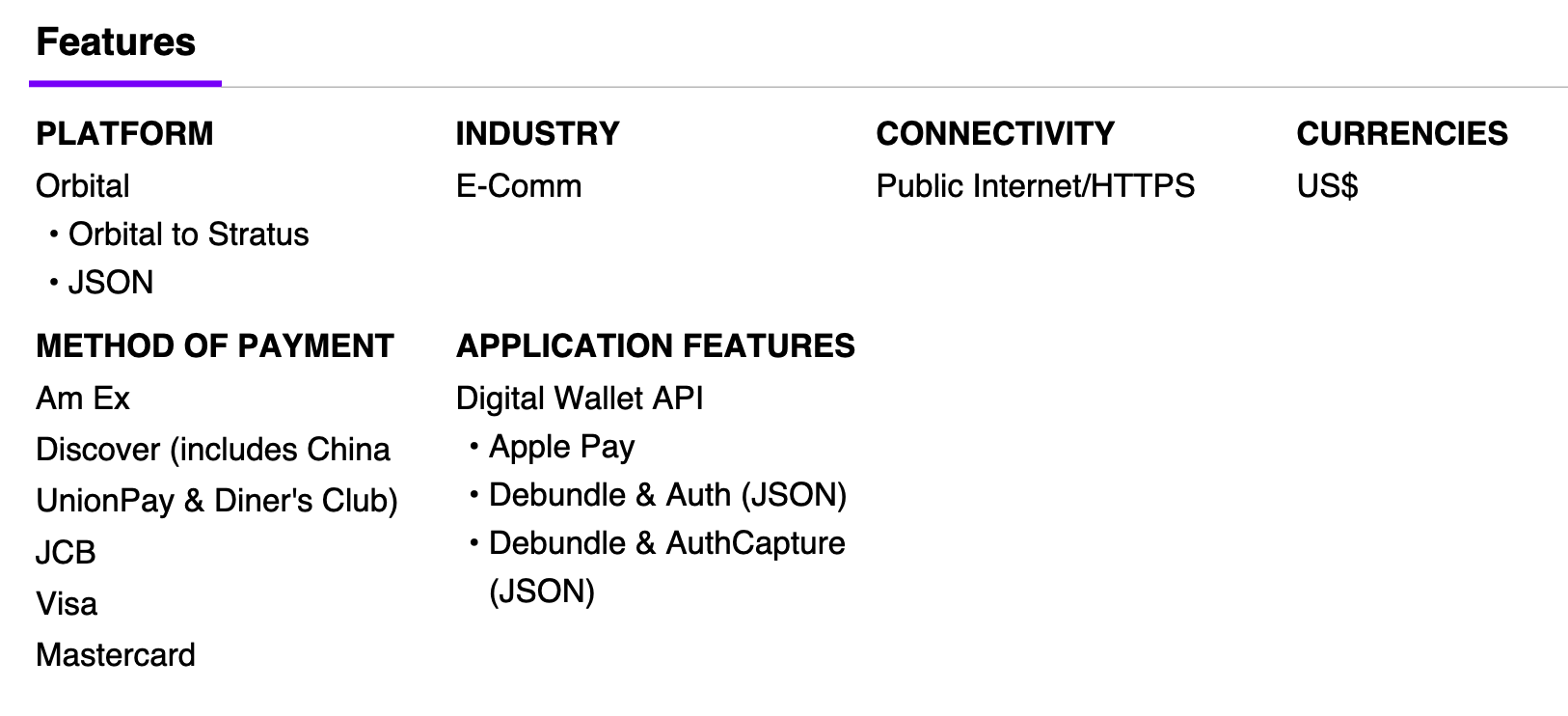
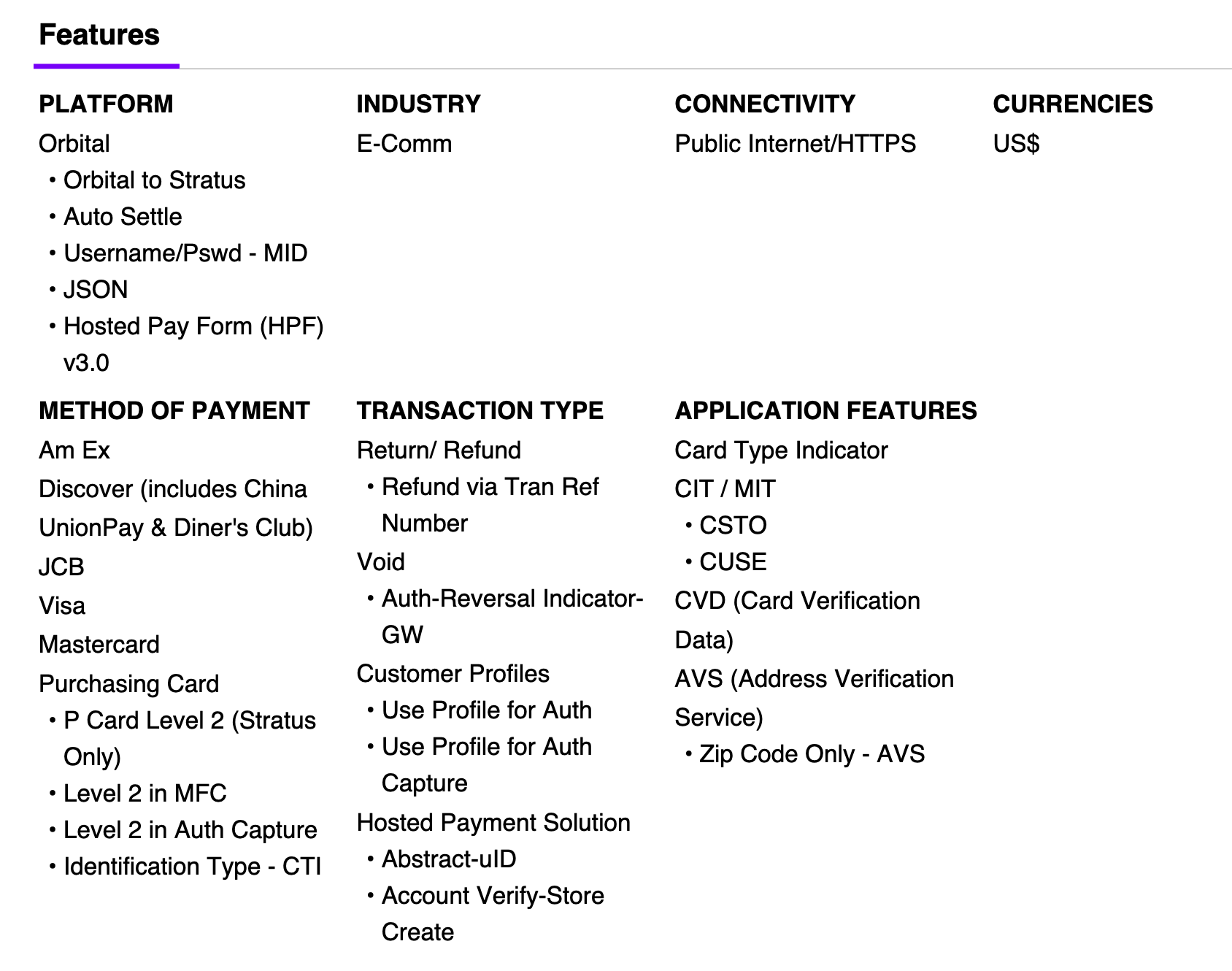
Below are images of the TPQ features that should be selected to leverage the Broadleaf Chase Payment integration module’s default functionality.
Once you have been granted access to the HPS portal, complete these steps.
Under Profiles > (your profile)
Configure Authorized Domains to include chase-var.hostedpaymentservice.net (in the testing environment) or chase.hostedpaymentservice.net (in production), as well as any other domains your HPS form might be loaded from (QA environment domain, production domain, etc).
Note that for local development, you won’t be able to use localhost, so run your application locally under a non-localhost domain name (ex: my-app.test) and include it in the whitelist.
Configure PAN Masking to 'Last 4'. This way, when our system queries for details about the HPS submission, all but the last 4 digits of the card number are masked out in the response.
Under HPS Forms
Configure a new named form in the form builder tool to match the UX and methods of payment you need to accept.
The name of this form will need to be specified in broadleaf.chase-payment.hps.provider.discriminated.form-name as explained in the Configuration Properties documentation.
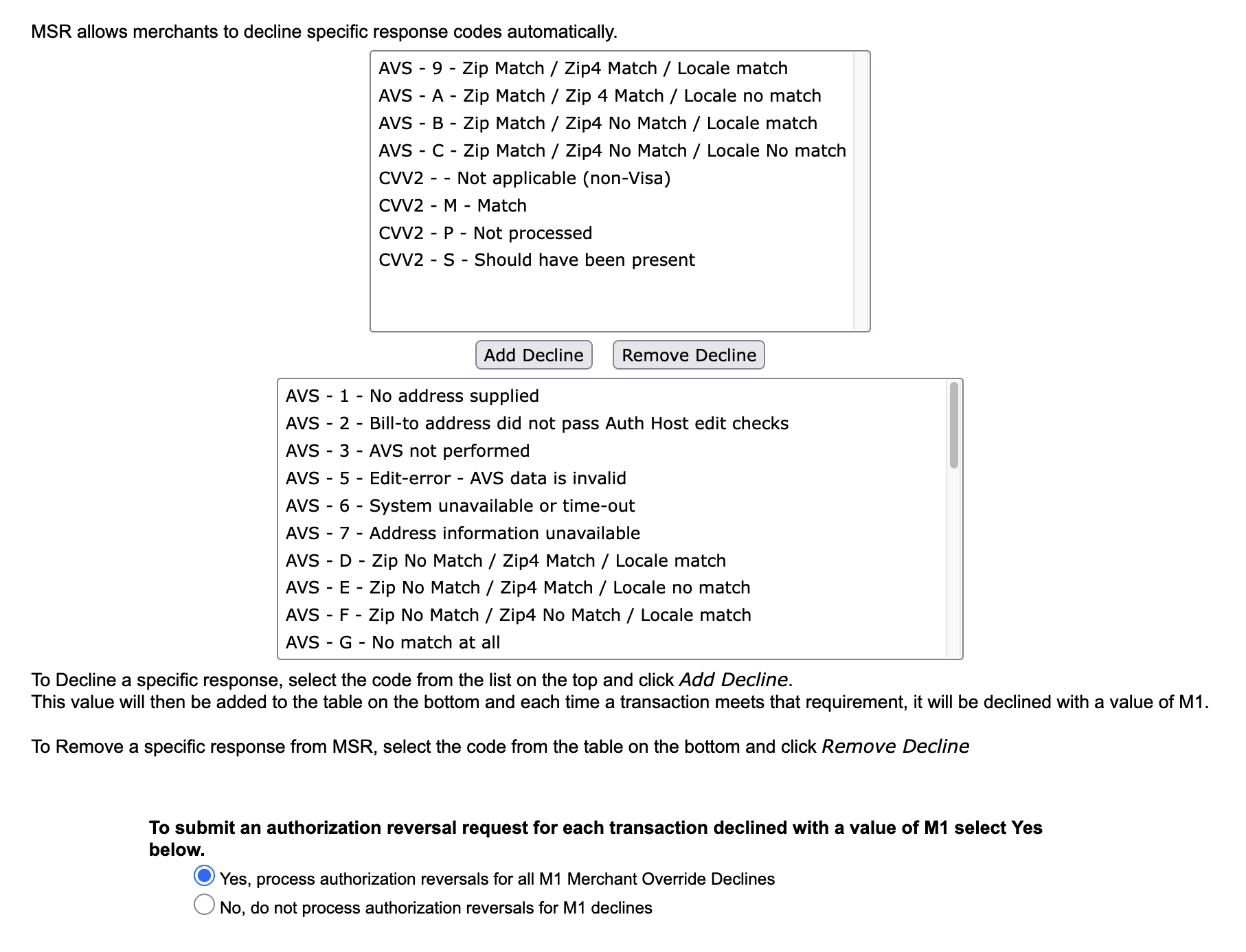
Once you have been granted access to Orbital Virtual Terminal, it can be used to configure Orbital’s Merchant Selectable Responses (MSR) feature.
This way, Address Verification (AVS) and CVV validations actually result in an M1 auto-decline (the customer’s submission will be directly rejected by Chase, they will have to retry, and the UID query response will more prominently report failure).
However, since MSR configuration applies at the MID level and affects HPS and Orbital API calls equally, it can’t be applied too aggressively.
For example, the backend won’t have the CVV available at the time it transacts with the Orbital API for auth/auth-capture, so we have to be careful in which CVV validation response codes we auto-decline.
Below is an example configuration of MSR. At the top are AVS/CVV response codes that will not result in an M1 auto-decline response, and at the bottom are AVS/CVV response codes that will result in an M1 auto-decline response (screenshot does not show every single decline code).
To use the Chase Payment module, add the Broadleaf Chase Payment Maven dependency to your PaymentTransactionServices project.
<dependency>
    <groupId>com.broadleafcommerce.microservices</groupId>
    <artifactId>broadleaf-chase-payment</artifactId>
</dependency>|
Note
|
The dependency’s version will be pulled from the Broadleaf release train pom.xml.
|
This section discusses the various configuration properties which are required to set for correct functionality.
broadleaf.paymenttransaction.service.discriminated.include-transaction-amount-breakdown must be enabled, especially to support Level 2 data capture
For each application/tenant that will be leveraging the Chase Payment functionality, ensure the following properties have values, or an error will be thrown. For more details, see Orbital Gateway properties documentation.
Provide the Orbital API credentials and Merchant ID assigned to you by Chase.
broadleaf.chase-payment.orbital-gateway.provider.discriminated.orbital-connection-username
broadleaf.chase-payment.orbital-gateway.provider.discriminated.orbital-connection-password
broadleaf.chase-payment.orbital-gateway.provider.discriminated.merchant-id
For each application/tenant that will be leveraging the Chase Payment functionality, ensure the following properties have values, or an error will be thrown. For more details, see HPS properties documentation.
Provide the HPS API credentials assigned to you by Chase.
broadleaf.chase-payment.hps.provider.discriminated.secure-id
broadleaf.chase-payment.hps.provider.discriminated.api-key
As noted above, provide the name of the form you configured in the HPS portal to broadleaf.chase-payment.hps.provider.discriminated.form-name
Below are property values that should be set in Cart Operation Services to enable use of the Chase Payment module.
broadleaf:
  cartoperation:
    service:
      checkout:
        checkout-payment-method-options:
          - payment-method-type: CREDIT_CARD
            payment-method-gateway-type: CHASE_ORBITAL
          # If using Apple Pay
          - payment-method-type: APPLE_PAY
            payment-method-gateway-type: CHASE_ORBITAL
        checkout-transaction-types:
          # This could also be AUTHORIZE, depending on business needs
          CHASE_ORBITAL: AUTHORIZE_AND_CAPTURE
CHASE_ORBITAL should be added to the following property to declare when transactions for this gateway should be executed, relative to other gateways, during checkout processing.
broadleaf:
  cartoperation:
    service:
      checkout:
        payment-gateway-priorities:
          - ...
          - CHASE_ORBITAL
- ...|
Note
|
These properties are application-discriminated, allowing different values to be provided on a per-tenant or per-application basis using different property paths. For example:
"mytenant" & "myapplication" being the Broadleaf Tenant and Application ids. |
Below are property values that should be set in Order Operation Services to enable use of the Chase Payment module.
CHASE_ORBITAL should be added to the following property to declare when ReverseAuthorize or Refund transactions for this gateway should be executed, relative to other gateways, when cancelling a fulfillment.
broadleaf:
  orderoperation:
    service:
      payment:
        cancel-payment-gateway-priorities:
          - ...
          - CHASE_ORBITAL
          - ...
CHASE_ORBITAL should be added to the following property to declare when Capture transactions for this gateway should be executed, relative to other gateways, when capturing payment for a fulfillment.
broadleaf:
  orderoperation:
    service:
      payment:
        capture-payment-gateway-priorities:
          - ...
          - CHASE_ORBITAL
          - ...
CHASE_ORBITAL should be added to the following property to declare when Refund transactions for this gateway should be executed, relative to other gateways, when refunding payment for a fulfillment return.
broadleaf:
  orderoperation:
    service:
      payment:
        refund-payment-gateway-priorities:
          - ...
          - CHASE_ORBITAL
- ...The Chase Payment Module introduces a few new endpoints to PaymentTransactionServices. These endpoints require permissions to be accessed, so the following seed data must be inserted into AuthenticationServices.
This SQL inserts the permissions/scopes necessary to access the HPS order abstraction 'UID Init' endpoint, which is used to obtain a UID for loading a Chase HPP/HPF.
Note that while the endpoint itself is configured to require this permission, the below seed data grants that permission to the customer role and to the anonymous client. Thus, effectively, this endpoint will be anonymously accessible.
-- CHASE INIT HPS UID
INSERT INTO auth.blc_security_scope (id, name, open) VALUES ('-1201', 'CHASE_HPS_UID_INIT', 'N');
INSERT INTO auth.blc_permission_scope (id, "permission", is_permission_root, scope_id)
VALUES ('-1212', 'CHASE_HPS_UID_INIT', 'Y', '-1201');
INSERT INTO auth.blc_permission_scope (id, "permission", is_permission_root, scope_id)
VALUES ('-1213', 'CHASE_HPS_UID_INIT', 'Y', '-100');

-- Add permission to customer role
INSERT INTO auth.blc_user_permission ("id", "archived", "last_updated", "name", "is_account_perm")
VALUES ('-1201', 'N', '1970-01-01 00:00:00.000', 'ALL_CHASE_HPS_UID_INIT', 'N');
INSERT INTO auth.blc_role_permission_xref (role_id, permission_id)
VALUES ('-100', '-1201');

-- Add permission to anonymous client (used for anonymous customers)
INSERT INTO auth.blc_client_scopes ("id", "scope")
VALUES ('anonymous', 'CHASE_HPS_UID_INIT');
INSERT INTO auth.blc_client_permissions ("id", "permission")
VALUES ('anonymous', 'ALL_CHASE_HPS_UID_INIT');
INSERT INTO auth.blc_client_scopes ("id", "scope")
VALUES ('openapi', 'CHASE_HPS_UID_INIT');
INSERT INTO auth.blc_client_permissions ("id", "permission")
VALUES ('openapi', 'ALL_CHASE_HPS_UID_INIT');This SQL inserts the permissions/scopes necessary to access the 'create Apple Pay session' endpoint, which is used for completing the 'merchant validation' Apple Pay flow.
Note that while the endpoint itself is configured to require this permission, the below seed data grants that permission to the customer role and to the anonymous client. Thus, effectively, this endpoint will be anonymously accessible.
-- CHASE CREATE APPLE PAY SESSION
INSERT INTO auth.blc_security_scope (id, name, open) VALUES ('-1200', 'CHASE_APPLE_CREATE_SESSION', 'N');
INSERT INTO auth.blc_permission_scope (id, "permission", is_permission_root, scope_id)
VALUES ('-1210', 'CHASE_APPLE_CREATE_SESSION', 'Y', '-1200');
INSERT INTO auth.blc_permission_scope (id, "permission", is_permission_root, scope_id)
VALUES ('-1211', 'CHASE_APPLE_CREATE_SESSION', 'Y', '-100');

-- Add permission to customer role
INSERT INTO auth.blc_user_permission ("id", "archived", "last_updated", "name", "is_account_perm")
VALUES ('-1200', 'N', '1970-01-01 00:00:00.000', 'ALL_CHASE_APPLE_CREATE_SESSION', 'N');
INSERT INTO auth.blc_role_permission_xref (role_id, permission_id)
VALUES ('-100', '-1200');

-- Add permission to anonymous client (used for anonymous customers)
INSERT INTO auth.blc_client_scopes ("id", "scope")
VALUES ('anonymous', 'CHASE_APPLE_CREATE_SESSION');
INSERT INTO auth.blc_client_permissions ("id", "permission")
VALUES ('anonymous', 'ALL_CHASE_APPLE_CREATE_SESSION');
INSERT INTO auth.blc_client_scopes ("id", "scope")
VALUES ('openapi', 'CHASE_APPLE_CREATE_SESSION');
INSERT INTO auth.blc_client_permissions ("id", "permission")
VALUES ('openapi', 'ALL_CHASE_APPLE_CREATE_SESSION');
Testing the standard credit card flow with HPS and Orbital profiles is fairly straightforward, as there are no webhooks or other complex configurations to deal with. Simply ensure you have the right required properties configured as described above, and make sure your local frontend (which will embed and load the Chase HPF) is served at a domain that is whitelisted in the HPS Portal’s Authorized Domains configuration.
For observability, it is highly recommended to add monitoring on the logs and exceptions that come out of the Chase Payment module.
The Chase Payment module has components that are placed under the following packages. Tuning and observing the logging output from them will be helpful in detecting problems.
com.broadleafcommerce.payment.service.gateway
com.broadleafcommerce.vendor.chasepayment
Some particularly interesting classes to add DEBUG logging around are com.broadleafcommerce.vendor.chasepayment.service.hps.support.HPSResponseCodeEvaluator and com.broadleafcommerce.payment.service.gateway.DefaultChaseOrbitalGatewayPaymentModificationService.
These classes are used during 'create payment' requests to verify whether a user’s Chase HPS submission was successful and valid.
If debug logs are enabled in these classes, they will output the specific reason that a user’s request was rejected.
These logs are disabled by default, as they would become very noisy (there would be a log entry for each time a user submitted invalid payment information).
Nonetheless, it can be helpful to enable them during initial integration testing, or for better diagnostics in lower environments.
There are also a variety of exceptions thrown by the Chase Payment module which are worth monitoring. They are listed below - please review the Javadocs for these classes for more details.
|
Note
|
In almost all cases, the system automatically logs at the error level when critical misconfigurations or gateway request failures occur. Monitoring for these messages is important to rectify issues in a timely manner. |
MissingRequiredConfigurationException
OrbitalRequestCreationException
OrbitalRequestResponseTransformerNotFoundException
OrbitalResponseInterpretationException
ProviderApiException
UnexpectedHPSFailureException
UnexpectedOrbitalRequestResponseException
PaymentException
ChasePaymentApplePayCertificateException
ChasePaymentCreateApplePaySessionException
For the production environment, the following changes will be required.
In the HPS Portal, ensure your production domain is listed under Authorized Domains
Update the API base URLs to point to the production Chase environment
As enumerated here, the Orbital Gateway API base URL properties should be updated
|
Tip
|
If monitoring/logging show errors indicating the Orbital Gateway is down, consider toggling broadleaf.chase-payment.orbital-gateway.provider.discriminated.use-primary-base-api-url to false, which will cause the secondary base API URL to be used instead.
|
broadleaf.chase-payment.orbital-gateway.provider.discriminated.orbital-primary-base-api-url should be set to https://orbital1.chasepaymentech.com
broadleaf.chase-payment.orbital-gateway.provider.discriminated.orbital-secondary-base-api-url should be set to https://orbital2.chasepaymentech.com
As enumerated here, the HPS API base URL properties should be updated
|
Tip
|
Make sure your frontend application is also updated to source the HPF/HPP from the production URL rather than the test environment. |
broadleaf.chase-payment.hps.provider.global.hps-base-api-url should be set to https://chase.hostedpaymentservice.net
Set the HPS API credentials and Orbital Gateway API credentials to match the right values for your production environment
See the Apple Pay documentation on going to production, if using Apple Pay with this integration.