
- v1.0.0-latest-prod
This page will discuss the domain entities present in the Billing service in depth. It will show what to look for to determine causes of failures and highlight important fields for reporting.
It will also walk through examples of failures and show how to correlate objects in PaymentTransactionServices (PTS) to the ones in Billing to get the full picture.
This section covers entities central to the billing flow. Chief among them is the BillingEvent entity.
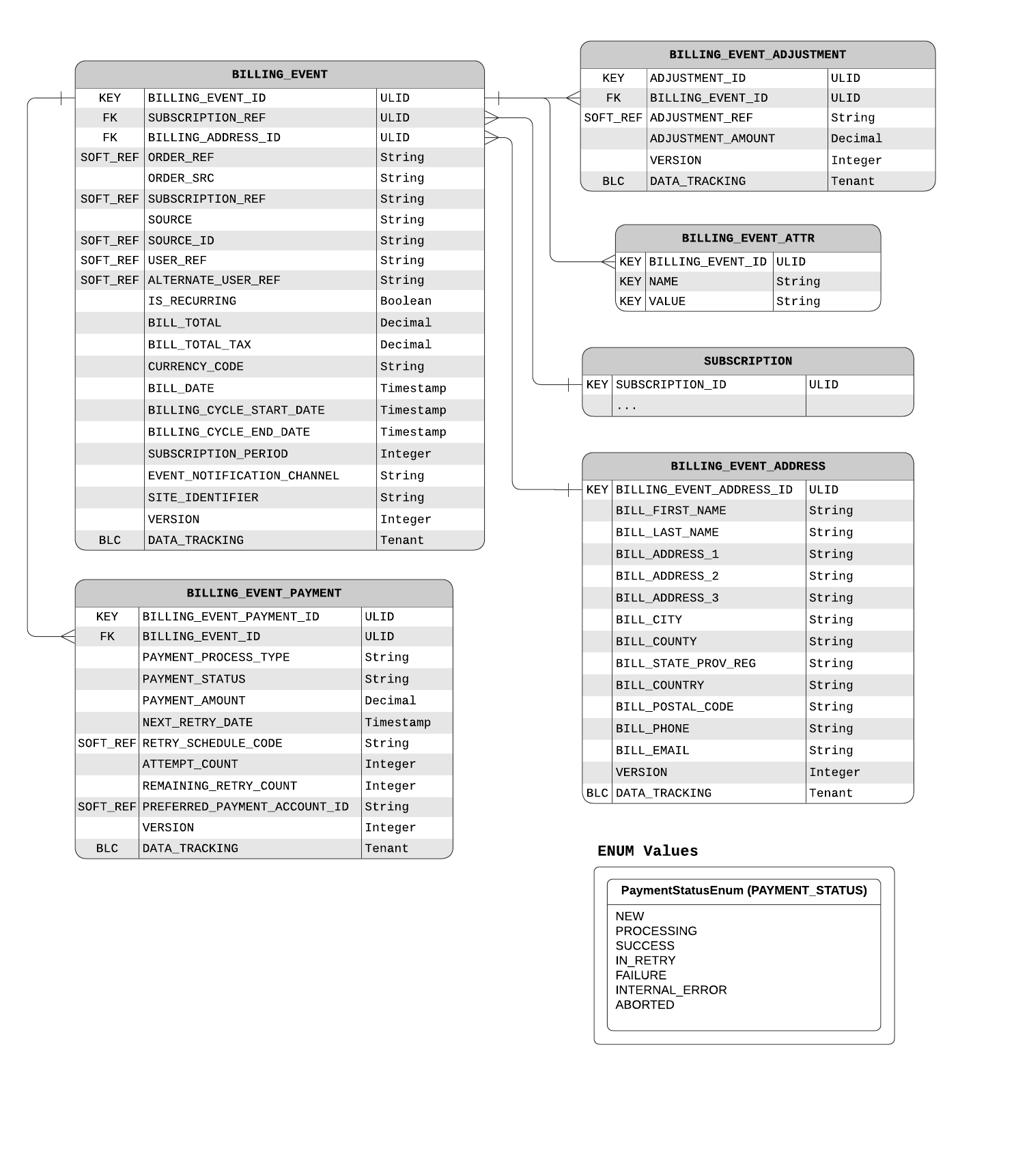
It has a multitude of related objects shown in the Data Model below.
Select important related entities - BillingEventPayment, BillingEventItem, and others - also have expanded descriptions further on this page.
The BillingEvent represents a specific instance of billing a customer for a Subscription.
It contains the summary fields, while BillingEventPayment and BillingEventItem contain further specifics.
The billTotal field stores the total sum billed for this BillingEvent
This includes the sum of all item prices, with prorated event-level adjustments and item-level adjustment included.
The item prices also include prorated tax amounts.
The billTotalTax field stores the tax amount for this BillingEvent
If this field is already populated before the Billing Job starts, the tax calculation module does not engage throughout the flow.
The BillingEventPayment object describes the details of this billing event as it relates to payment.
Specifically, it contains the payment status, the payment amount, and several fields concerning the retry logic.
The paymentStatus field loosely tracks the status of the payment transaction attempt.
A more specific and up-to-date status can be found on the PaymentTransactionDetail
The paymentAmount field stores the total intended to be charged for this billing event.
The preferredPaymentAccountId field stores the id of the preferred PaymentAccount to use for this payment.
This field impacts the ordering of saved payment methods (payment accounts) by the WalletService.
Learn more on the Preferred Payment Account page.
The retryScheduleCode field contains a reference to the RetrySchedule that sets retry rules for this refund event.
The nextRetryDate field is set when a RetrySchedule is consulted to provide an appropriate date for the next retry attempt.
The attemptCount field holds the current total count of billing attempts for this refund event.
The remainingRetryCount field holds the number of retries this refund event has left.
When a BillingEvent is generated for a Subscription, BillingEventAdjustments are created from SubscriptionAdjustments that are valid for the current billing cycle.
The fields on this object are largely copied from the SubscriptionAdjustment.
The only exception is the adjustmentAmount which gets applied to the BillingEvent total through the rules described by SubscriptionAdjustment#subscriptionAdjustmentType.
Additionally, the BillingEventAdjustment object does not contain beginPeriod and endPeriod fields as the object is only created if the current billing cycle is between the validity period ends.
image::billing-event-item-data-model.png
|
Note
|
To learn more about the BillingTaxDetail, visit the Tax module documentation.
|
When a BillingEvent is generated for a Subscription, BillingEventItems are created from SubscriptionItems.
The fields on this object are largely copied from the SubscriptionItem.
** The only exception is the totalTax field, which starts out as null until is it filled by the DefaultBillingEventPricingService later in the flow.
When a BillingEvent is generated for a Subscription, BillingEventItemAdjustments are created from SubscriptionItemAdjustments.
Additionally, BillingEventItemAdjustments are also generated to prorate the event-level BillingEventAdjustments to the item-level later in the flow.
Implemented in DefaultBillingEventService#generateProratedEventItemAdjustments, this allows items to be aware of all event-level adjustments and for pricing totals to become consistent between the sum of the item-levels' and the event-level.
An item adjustment indicates that it is prorated by setting the proratedFromEventAdjustmentId field.
The fields on this object are copied from the SubscriptionItemAdjustment, with a few omissions as only subscription adjustments valid for this billing cycle have created BillingEventItemAdjustments.
** Note that an item adjustment indicates that it is prorated by setting the proratedFromEventAdjustmentId field.
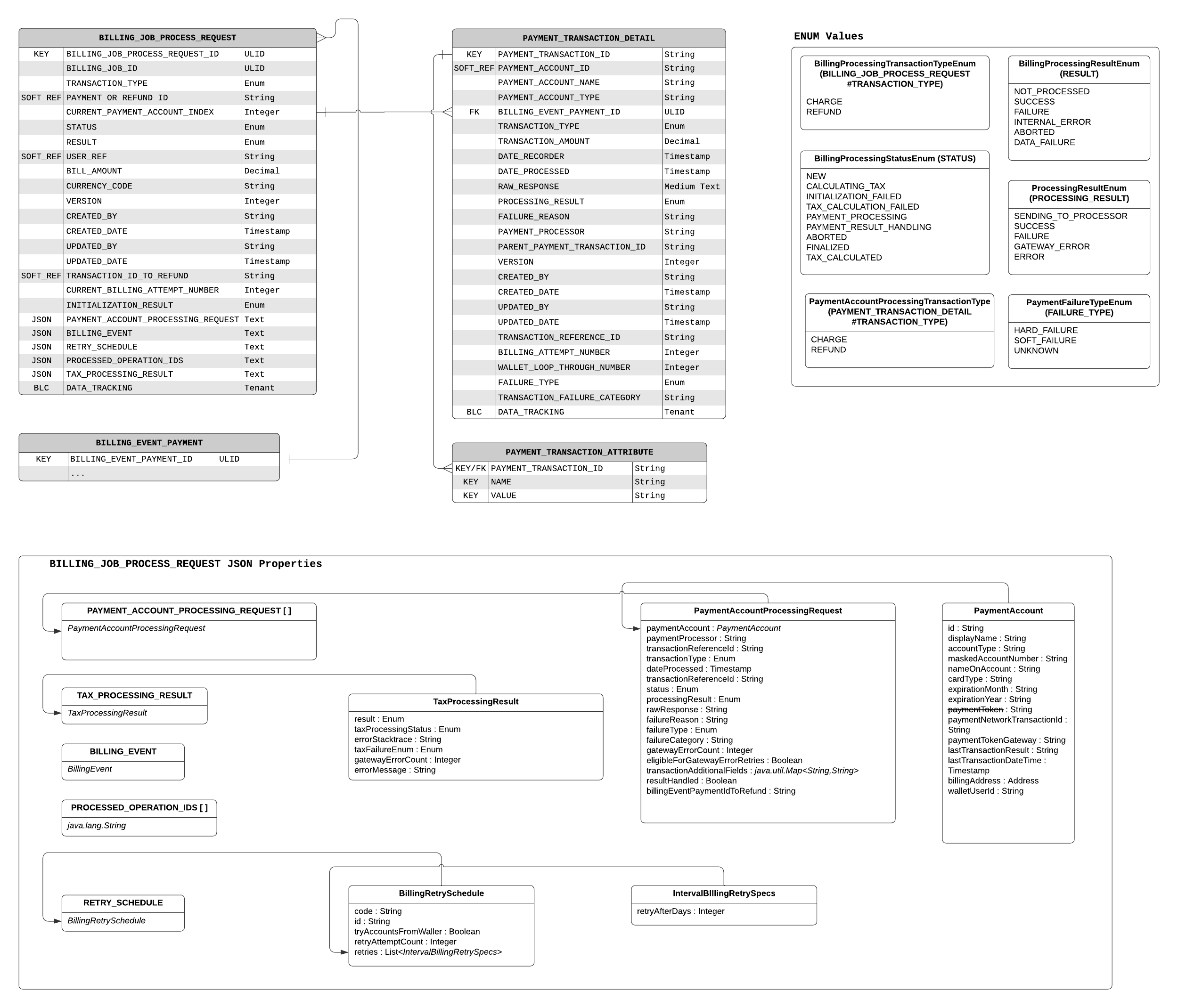
The Billing Job, as detailed here, is a sequential flow of handlers that bill users for their subscriptions. It starts from BillingEvents and RefundEvents, processes payment transactions, and persists the effects of the result onto related entities.
In the process, domain entities are created and updated as the job progresses. Whether aiming to customize or just to ensure smooth operation, it helps for developers to understand where to look to confirm billing was successful or to find out how it failed.
The BillingProcessingRequest is the main DTO used throughout the Billing Job to transfer information about payment methods, transactions, their results, and more.
The accounts field on the request stores a list of PaymentAccountProcessingRequests, one for each saved payment method for a given customer.
To learn more, see this section.
The currentAccountIndex field holds the index number for the accounts list.
It holds the index of the payment account that will be used to bill the user in this run.
This field usually increases when a request fails with an expected failure.
The status fields holds the current status of the request.
It is updated as the request goes through the stages of the flow, and will hold the last stage that the request encountered in case of a failure.
Note that within payment processing, status fields on the PaymentAccountProcessingRequest and the PaymentTransactionDetail would provide a more granular view.
The result field is only set after the request has finished processing.
Note that the request may not have gone through the entire flow, or it may not have even been successful, but this field could be set if the request has reached one of the final destinations in the flow:
DefaultBillingProcessingRequestFinalizerService
If the property billing.job.execute_only_tax_calculation is set, DefaultTaxCalculationHandlerService
If the payment request failed in an irrecoverable way, ProcessPaymentsDeadLetterRetryHandler.
The currentBillingAttemptNumber field holds the attempt number for this payment or refund to be processed.
The initializationResult field holds the result of the requests initialization by BillingProcessingRequestInitializer.
The processedOperationIds is a list of Strings holding IDs of handler processes of all stages it has completed so far.
It is added by each message DTO extending AbstractBillingOperation.
The taxProcessingResult field holds a TaxProcessingResult object containing the result of the most recent tax calculation attempt executed against this request.
Its most important member field is gatewayErrorCount.
It is consulted to determine whether this request is eligible for more tax retries, and it is incremented on each retry.
New Change: This field is now persisted.
The PaymentAccountProcessingRequest is a DTO that stores information about the saved payment method and the transaction being attempted against it.
It is stored as a list on the BillingProcessingRequest, with the current payment account request designated by BillingProcessingRequest#currentAccountIndex.
hen debugging payment failures or setting up reporting, this request is a great place to start.
More details about the payment transaction itself can be found in PaymentTransactionDetail.
The paymentAccount field holds details of the saved payment method. It is gathered by the SavedPaymentMethodProvider from PTS.
The paymentProcessor field records the payment processor (payment gateway) that should be handling this payment method
The transactionReferenceId field is a unique value for this transaction used by the processor to rule out duplicates.
The transactionType field hold the type of the transaction.
By default, it can be CHARGE or REFUND.
The status field holds the status of processing this request.
The processingResult field holds the transaction result.
The rawResponse field is usually only populated for failures.
It records the message of the exception that occurred in the processor, or back in BillingServices while processing the transaction.
The failureReason field is usually the code that the gateway returns if a failure occurred.
The failureType field holds the type, HARD or SOFT, of the failure.
The failureCategory field holds a simple categorization of the failure that was encountered while attempting the transaction.
Note: This is meant to be an informative abstraction beyond the raw response codes provided by payment gateways.
Possible values may include: GATEWAY_CREDENTIALS_ERROR, INVALID_PAYMENT_METHOD, PROCESSING_FAILURE, GATEWAY_ERROR, or NETWORK_ERROR.
The transactionAdditionalFields are name/value pairs of additional attributes.
Payment providers and gateways should use this to pass through implementation-specific information.
A pair of setters is provided for easy operations with this map.
|
Tip
|
processingResult is the first field to look at when debugging a transaction.
|
The PaymentTransactionDetail object represents a single transaction’s state and results.
The dateProcessed field is set just before the transaction is sent over to the payment processor.
This field is significant since it is used by the Unknown Gateway Payment Response Resolution flow to filter out transactions processed in the last 24 hours to avoid concurrency issues.
The dateRecorded field is set after the transaction result is received from the payment processor.
The combination of this and the prior field’s values (or lack thereof) is useful for debugging payment processing issues.
The processingResult field holds a transaction processing result.
Note: this is related to, but distinct from, PaymentAccountProcessingRequest#processingResult.
This field holds less specific values, while the field mentioned above contains more extensive detail.
The originalTransactionId field holds a reference to the transaction that this transaction is a follow-up to.
This is most notably used when the current transaction is a refund for a previous charge the reference to which will be held in this field.