
- v1.0.0-latest-prod
This page covers a multitude of ways Billing Job results are handled by BillingServices.
From retries to looking up results of transactions that were never returned, the Service provides tools to handle failures and mistakes of many shapes.
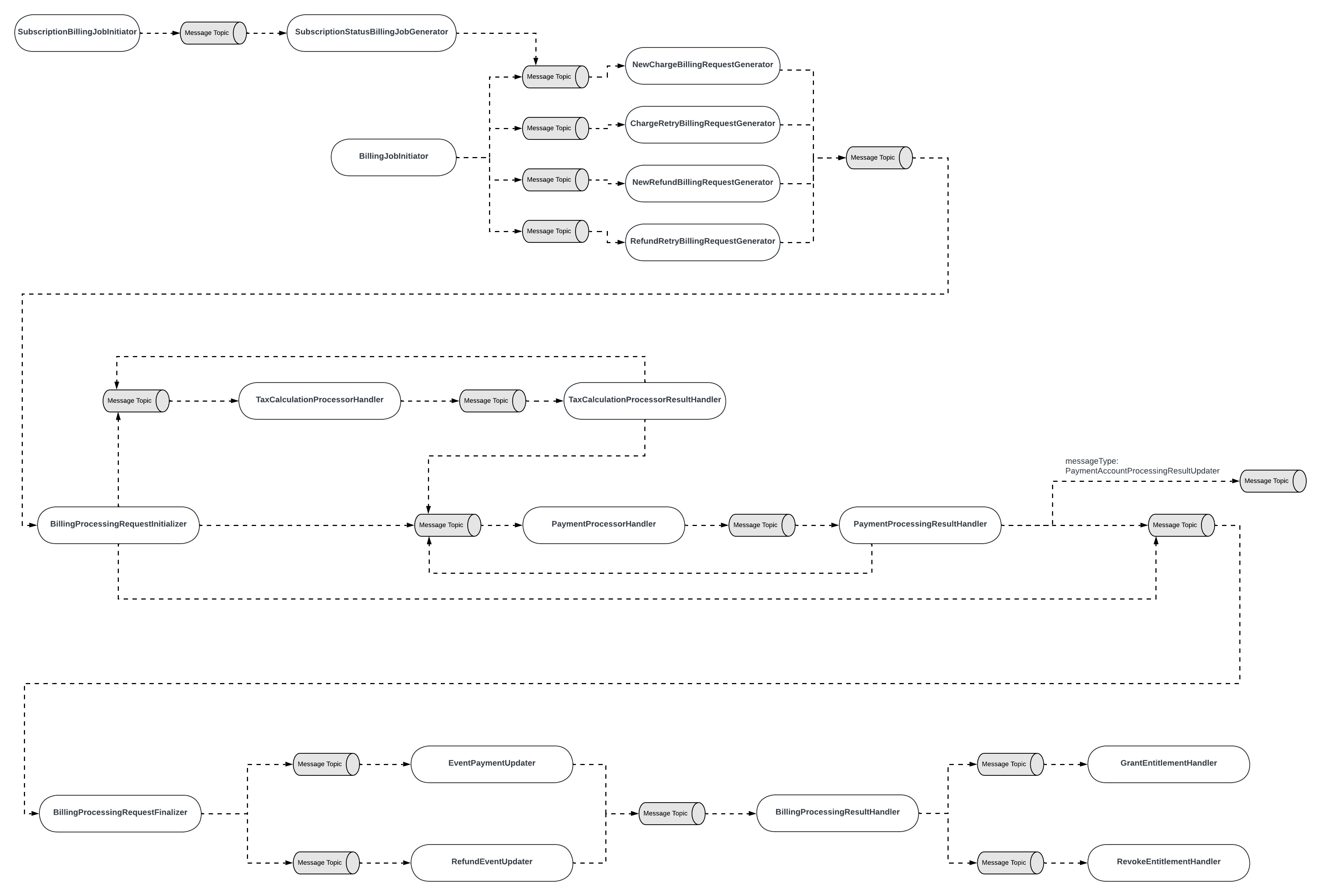
As you work to understand the various flows, keep in mind this message flowchart to understand how they fit into the larger Billing and Subscription Billing Jobs:
When a transaction attempt receives a FAILURE result, the request it is executing has a few layers of recovery that it may attempt.
A common result handling mechanism is retrying the billing request.
Both CHARGE and REFUND-type billing attempts are capable of retries.
The first course of action taken by PaymentProcessingResultHandler is to retry the billing action with another PaymentAccountProcessingRequest.
The currentAccountIndex is incremented, and the payment is retried again by resending the BillingProcessingRequest’s id in a message to PaymentProcessorHandler.
Given that all attempts to use another payment account have failed as well, the PaymentProcessingResultHandler allows the FAILED-status request to proceed until EventPaymentUpdater (or RefundEventUpdater for refunds).
Both updaters delegate to DefaultPaymentAndRefundUpdaterService to handle next steps with the entities (BillingEventPayment and RefundEventDetail).
For CHARGE-type payments specifically, the service verifies that:
The failure reason was NOT that no accounts were found for the customer
Not all Payment Accounts on the customer were hard failures.
If all payments were hard failures, a retry would not improve the outcome for any of them.
Next, for both billing types, the NextBillingRetryDateCalculator is consulted to determine if a retry date can be set for the request.
The calculator uses the BillingRetrySchedule on the billing request to determine how many days out to schedule the retry.
The request then continues on in the flow to being finalized for this Billing iteration and the request remains dormant until the next Billing Job that is willing to execute it picks it up. Learn more about the retry execution in the following section.
The Billing Job is capable of processing Charge and Refund retries when called from BillingJobEndpoint#initiateBillingJob.
The request object, InitiateBillingJob, contains toggles to allow processing (or excluding) specific requests for any given API call of the endpoint.
If they are chosen to be processed, retry requests contain similar logic to new Charges and Refunds:
BillingEventPayments or RefundEventDetails are read from the database filtering them by status IN_RETRY and their RetryDates being within the Billing Job’s date range as declared by the API request body.
New BillingProcessingRequests are created for each collected payment or refund.
The requests are sent on to BillingProcessingRequestInitializer to begin processing.
BillingRetrySchedules define the retry policy for a given payment or refund.
Retry schedule defaults can be set in a multitude of ways.
Default retry schedules can be defined via configuration properties for all payments and/or refunds (e.g. see BillingJobProperties#defaultPaymentRetrySchedule).
Property names should match the BillingRetrySchedule fields to be a valid object. This route requires at minimum that the user provide values for the following:
the retry schedule’s id
a boolean for allowing to try other accounts from the user’s wallet for billing
a maximum retry attempt count
a list of IntervalBillingRetrySpecs defining how many days to wait for each consecutive retry attempt.
Another approach is a combination of persistence and configuration approaches.
Having persisted BillingRetrySchedules, a default retry schedule id (i.e. code) reference can be defined for both refunds and charge payments to pull a persisted schedule once it is needed.
Use billing.job.default-payment-retry-schedule-code and billing.job.default-refund-retry-schedule-code to exercise this logic.
|
Note
|
To find out how to create a custom retry schedule, see the Custom Retry Schedule section. |
A specific BillingEventPayment or a RefundEventDetail can also hold references to their preferred retry schedules in the retryScheduleCode fields.
For BillingEventPayments, this reference is transferred from the original Subscription’s billingFrequency field.
By default, the retry length would match up with the length of a subscription’s billing cycle, if such a retry schedule is created.
A RefundEventDetail’s retry schedule code should be set on its creation.
Afterward, when a BillingProcessingRequest is created from a BillingEventPayment or a RefundEventDetail, the BillingRetryScheduleResolver is engaged to populate the retry schedule object from fields on the payment or refund.
It follows a defined procedure:
See if a retry schedule defined by the retryScheduleCode fields on the objects can be found.
If it’s not, it attempts to find a schedule using the default retry schedule code for this type of payment
If none is found or no code was set, it uses the default retry schedule as defined per payment type in BillingJobProperties.
When needed by the DefaultNextBillingRetryDateCalculator, the retry schedules are already on the BillingProcessingRequest.
Their fields inform the remaining attempt counts as well as how many days should pass until the retry will be reprocessed.
This section covers transactions that are returned with indeterminate results.
As described by Payment Transaction Services documentation, an indeterminate result means that the true outcome of the transaction is not known. For example, if a transaction is sent to the payment processor but a network error occurred, it is not known to us whether the user was actually charged or not (thus, the result is indeterminate).
When handling such transactions in the Billing service, they are equated to gateway errors (PaymentAccountProcessingResultEnum#GATEWAY_ERROR). We explain how gateway errors are handled in a following section.
This section covers transactions whose results are unknown. The most common situations that may occur to find a request in this state are outages of the Billing service deployment during the time the payment provider is processing the payment.
|
Note
|
This result is distinct from the Indeterminate Transactions described above. An unknown transaction result state occurs when Billing does not hear back from its request to execute a transaction, while the indeterminate result occurs when PTS does not hear back from the payment gateway and successfully communicates this state to Billing. |
To resolve this state, the Billing service provides a robust mechanism of looking up their results from PTS and reacting to the outcomes when possible.
The mechanism can be kicked off by sending a request to the BillingJobEndpoint#resolveUnknownPaymentGatewayResponses endpoint.
The following bird’s eye view diagram shows the mechanism within BillingServices as well as its interactions with PaymentTransactionServices:
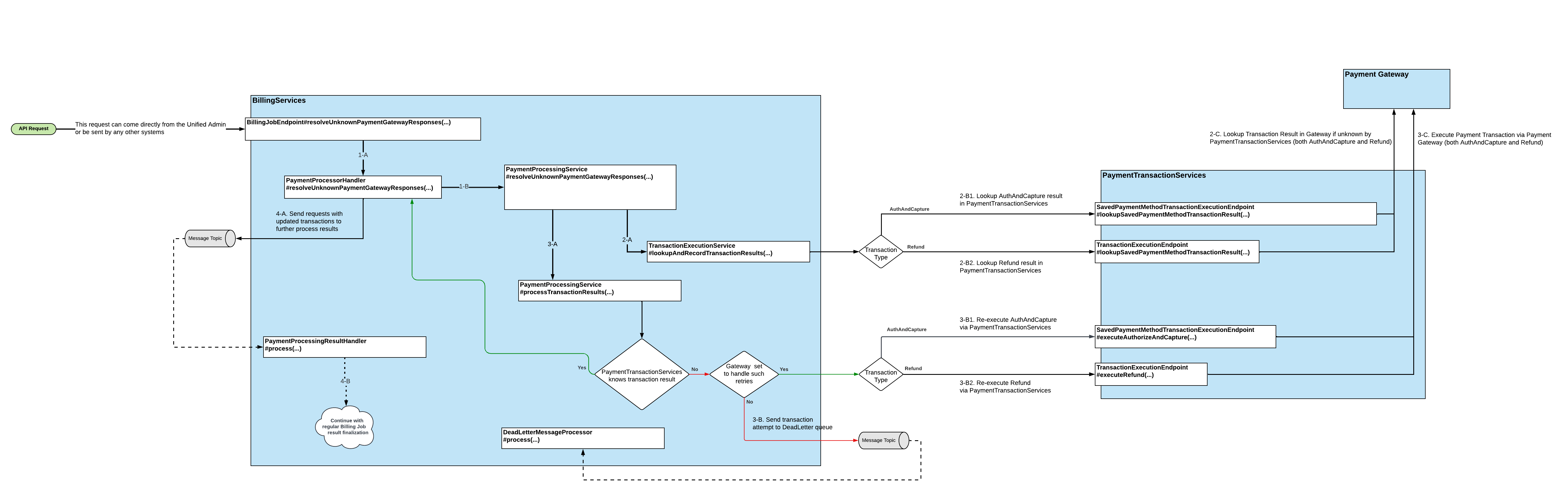
PaymentProcessorHandler#resolveUnknownPaymentGatewayResponses retrieves PaymentTransactionDetails to be considered by the rest of the flow using the following criteria:
Their processingResult is equal to ProcessingResultEnum.SENDING_TO_PROCESSOR.
Their dateProcessed is earlier than 24 hours before this flow is executed. The goal of this requirement is to avoid colliding with active Subscription Billing Jobs that are still processing transactions or waiting on a response.
In phase 3-A, the flow splits transactions for which PTS did not know the result based on "Gateway set to handle such retries".
This is a reference to the DefaultPaymentProcessingService’s call to BillingJobProperties#shouldCallProcessorIfTransactionNotFound(…). Simply put, it checks configuration properties for the given gateway.
To change this behavior for a given payment gateway, set the configuration property billing.job.payment-gateway-config.[payment gateway].should-call-processor-if-transaction-not-found where [payment gateway] should equal to the name of the payment gateway as known by PTS.
If no property is set, the outcome defaults to False.
If a retry should not be executed for a gateway due to its configuration, the transaction will be sent to the DeadLetter queue to be dealt with offline.
This section covers the ways the service handles various errors and ways to resolve them.
This section covers ways that the Billing Job currently resolves Gateway Errors (PaymentAccountProcessingResultEnum#GATEWAY_ERROR).
|
Note
|
Gateway Errors mostly result from indeterminate transaction results. |
The Billing Job groups requests with Gateway Error results together.
In PaymentProcessingResultHandler, they are sent to be reprocessed by the PaymentProcessorHandler, subject to the following conditions:
Their current PaymentAccountProcessingRequest is eligible for gateway retries.
This is determined by a series of hook points in DefaultPaymentProcessingService and DefaultPaymentTransactionExecutionService.
By default, the hook points return false for all gateways.
This hook point should be customized to enable retries for gateway errors.
The gateway error count for the payment account request is less than or equal to the limit set by the configuration property billing.job.gateway-error-retry-limit.
If the request does not fit the criteria above, it is then sent to the Dead Letter Queue.
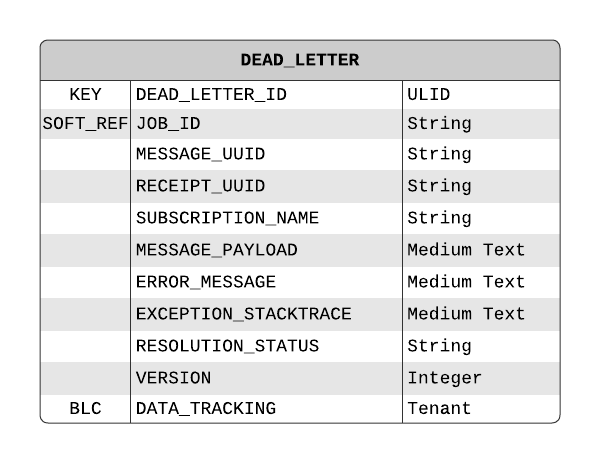
The DeadLetter queue is a temporary storage location for requests that failed during execution for various reasons and the system is not able to resolve the issues on its own.
The service provides a handler interface which a client may use to allow the system to automatically retry requests that encountered certain types of issues.
If no such handler is available, a DeadLetter requires manual resolution.
Retry of DeadLetters by a handler can be triggered using DeadLetterQueueEndpoint.
Requests reach this queue if their payments irrecoverably failed, tax calculation attempts faltered, a messaging error occurred, and in a few other cases.
All flows that may feed requests into the DLQ can be found by searching for usages of DeadLetterMessageSender#sendToDeadLetterQueue
Below is a visual summary of all sources that feed into the DeadLetter queue directly:
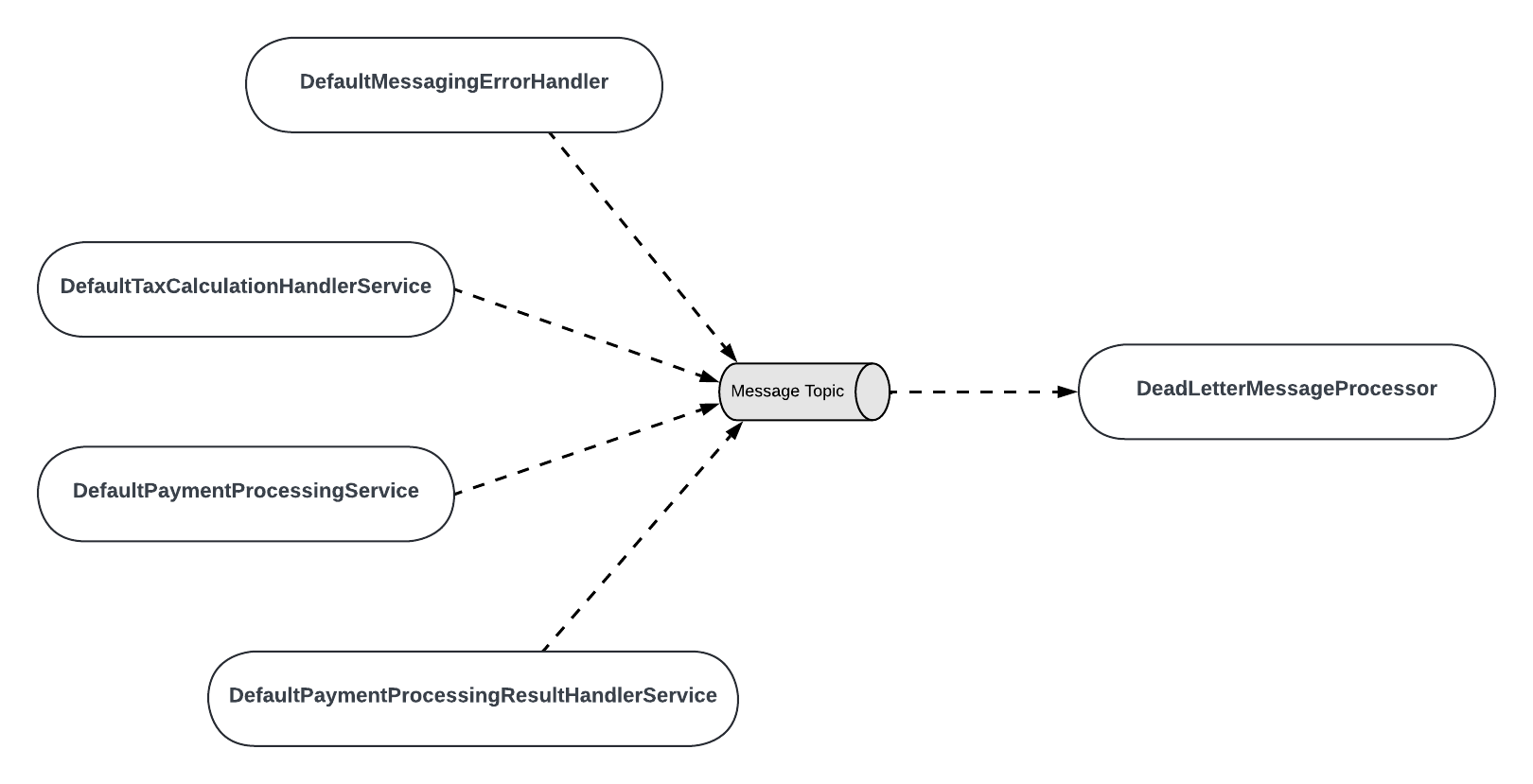
DefaultMessagingErrorHandler is engaged any time an error in messaging occurs in Billing. Therefore, while it is the source contributing to the queue, the origin of the error may be elsewhere in BillingServices.
|
Important
|
Note that Billing’s DeadLetter Queue is distinct from Broadleaf’s general DeadLetterQueue concept that supports SpringCloudStream error handling. |