
- v1.0.0-latest-prod
This page provides a rundown of core entities for the refunds feature. It also walks through ways a refund can be triggered manually, or can be executed as part of the Billing Job.
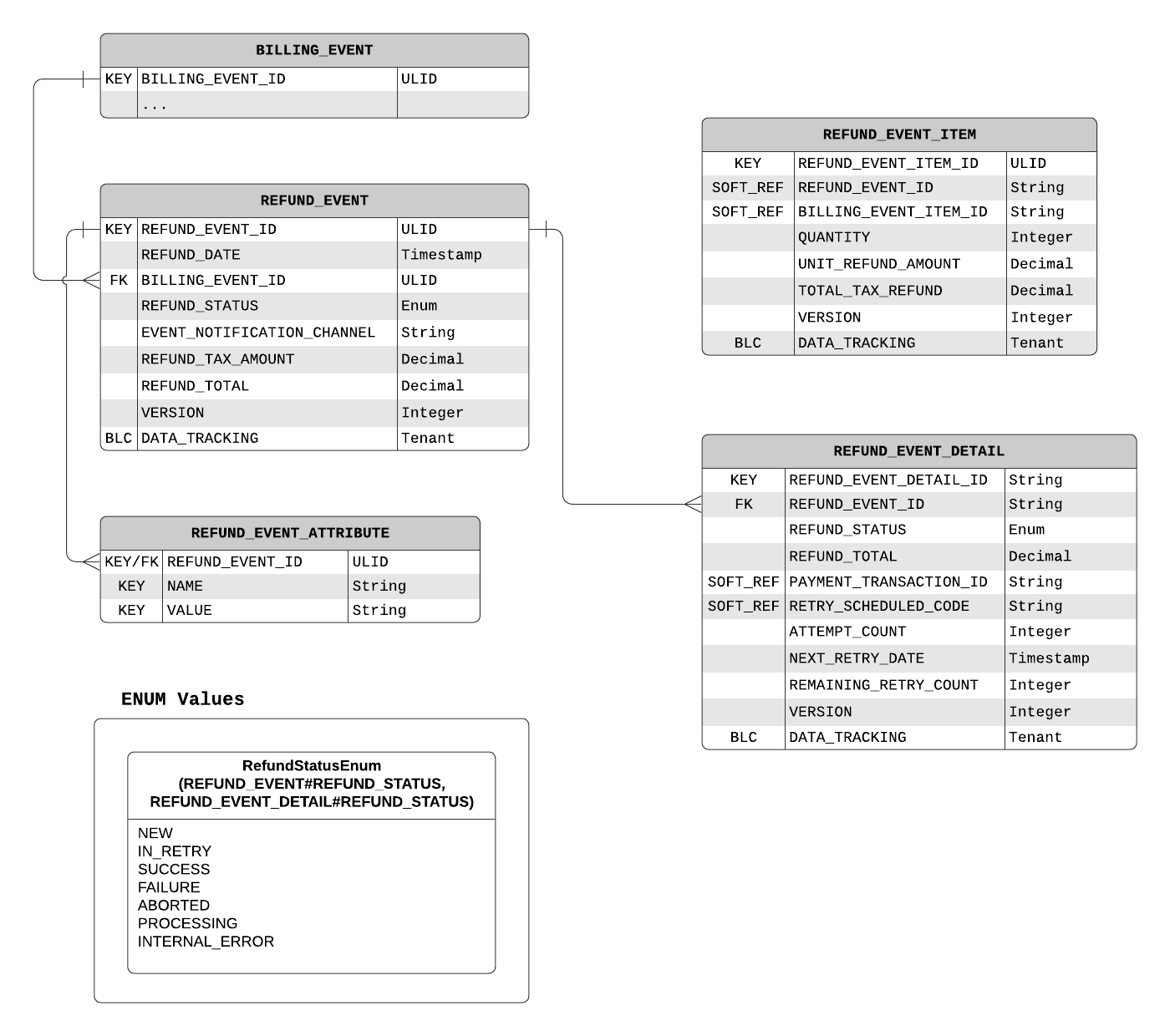
This section introduces domain entities essential to understanding the refunds mechanism of the Billing service. It gives a description of critical fields, as well as providing an exhaustive Data Model to show all fields, entity relationships, and possible Enum values of this feature.
The RefundEvent is the counterpart of the BillingEvent when it comes to processing refunds.
It tracks the summary fields for a given refund attempts and has RefundEventDetails to store the particulars as the refund progresses through the flow.
The refundStatus field is the aggregate field that summarizes the status of a refund as RefundEventDetails go through the stages of processing the refund.
While it is likely that only a single RefundEventDetail exists per refund event, the logic in DefaultRefundEventService#setRefundStatusFromRefundDetails is built to handle a multitude of detail objects at once.
Some end statuses can only be achieved if all details within a group have reached that status (acting as minimums), while others are set if even a single detail has that status (maximums).
The RefundEventDetail is the workhorse object of the refunds feature.
It contains the detailed fields necessary to create a BillingProcessingRequest that is used by the Billing Job.
Once the Billing Job finishes its processing, the detail entity also records the intricacies of the result.
The refundStatus field actively tracks the status of the refund attempt.
The field receives its final value after the attempt is completed by the Billing Job.
The originalTransactionId field is a reference to the original PaymentTransactionDetail that this refund attempts to reverse.
The retryScheduleCode field contains a reference to the RetrySchedule that sets retry rules for this refund event.
The nextRetryDate field is set when a RetrySchedule is consulted to provide an appropriate date for the next retry attempt.
The attemptCount field holds the current total count of billing attempts for this refund event.
The remainingRetryCount field holds the number of retries this refund event has left.
The RefundEventItem entity tracks the refund process for a given BillingEventItem.
Its fields are basic and can be found on the data model.
This section will discuss how a refund may be manually triggered.
A refund for a given BillingEvent can be processed by simply creating a RefundEvent through BillingEventEndpoint#createRefundEvent referencing the desired entities in its fields.
Then, a request to initiate a Billing Job with the processNewRefunds parameter set to true and the dates encompassing the refund created above is all that is necessary for a refund to be processed.
However, this approach will not reflect on the Subscription to which the BillingEvent was connected.
To cancel the effects of the subscription and refund it, see Cancelling a Subscription in advance.
A refund can also occur during a Billing Job run.
After a payment has been processed, the BillingProcessingResultHandler#updateSubscriptionForPaymentSuccess checks whether subscriptions that were billed have been cancelled since.
If they have, the subscription is cancelled & a refund is started via the regular subscription cancellation flow.
As the subscription is cancelled, the default refund procedure is explained in the next section.