Broadleaf Microservices
  • v1.0.0-latest-prod

Kafka + KRaft + Strimzi Operator

Important
The following documentation is only applicable to Initializr-based projects running Release Train 2.3.0+ and you have kafka selected as your mesage broker

The 2.3.x release of Broadleaf Microservices marks a significant architectural shift: we are officially moving away from the legacy Kafka + ZooKeeper setup and adopting Kafka + KRaft as our out-of-the-box default.

KRaft (Kafka Raft) is the modern, recommended metadata management system for Apache Kafka, replacing ZooKeeper (deprecated in 3.5, removed in 4.0). More information on Kafka KRaft can be found on official documentation.

To streamline this transition on Kubernetes, we are also introducing the Strimzi Kafka Operator to manage these clusters.


Motivation for the Move

The primary driver for this change is the evolution of the Kafka ecosystem itself. Kafka is replacing ZooKeeper with KRaft (Kafka Raft metadata mode) to manage cluster metadata and coordination more efficiently. By utilizing KRaft, we reduce architectural complexity and improve scalability.

Additionally, we’ve integrated the Strimzi Operator because it is the industry-recommended standard for managing, deploying, and operating Kafka clusters within a Kubernetes environment.


Key Takeaways for Developers

Net-New Installations

Starting with the 2.3.0-GA Release Train, any project generated via the Broadleaf Initializr will default to the KRaft-based architecture.

  • The manifest.yml will now include new components: kafka-kraft-broker and kafka-kraft-controller.

  • The legacy kafka broker component will be disabled by default in these new projects.

example manifest.yml with new Kafka KRaft components

- name: broker <---- new component enabled
  platform: kafka-kraft-broker
  descriptor: snippets/docker-kafka-kraft-broker.yml
  enabled: true
...
- name: kafka-kraft-controller <---- new component enabled
  platform: kafka-kraft-controller
  descriptor: snippets/docker-kafka-kraft-controller.yml
  enabled: true
...
- name: broker <---- old component disabled
  platform: kafka
  descriptor: snippets/docker-kafka.yml
  enabled: false

Legacy Support

We haven’t pulled the rug out from under you. The legacy ZooKeeper + Kafka setup remains fully supported.

  • Existing projects can continue using their current manifest.yml configuration without forced changes.

  • Broadleaf initializr/starter components are designed to support both topologies depending on your manifest composition.

Migration & Data ⚠️

Important: This release focuses on net-new installations or total replacements.

  • We do not provide an automated "live" migration path to preserve data from an existing ZooKeeper cluster to a KRaft cluster.

  • The steps provided in our documentation assume you can completely replace the old installation.

  • If you require a zero-downtime migration, we recommend consulting external resources as this would require careful planning, backups, and extensive testing in lower environments as there are many different strategies depending on your setup. There are several resources online that help describe these different strategies. For example:


Notable Technical Changes

Updated K8 Install Script and Helm Charts

When running helm:generate on a KRaft-enabled manifest.yml project, you will see some updated Kafka installation steps (i.e. in the generated install.sh) that reference new helm charts which deploy the Strimzi Operator (along with other custom resource definitions)

Updated Broadleaf Kafka Image

We have released a specialized Secure Broadleaf Kafka Image with KRaft and Strimzi Operator support. This secure image will be referenced automatically with a docker-compose:generate or helm:generate on a new KRaft-enabled manifest.yml file.

This image has been updated to support Strimzi-related assumptions and includes compatibility for both KRaft and the Strimzi Operator.

Connection String Updates

The Strimzi Operator manages resource naming differently. You will need to update your connection strings.

  • Old: kafkacluster-0.kafkacluster-headless.default.svc.cluster.local:9094,kafkacluster-1.kafkacluster-headless.default.svc.cluster.local:9094,kafkacluster-2.kafkacluster-headless.default.svc.cluster.local:9094.

  • New: kafka-strimzi-broker-0.kafka-strimzi-kafka-brokers.default.svc.cluster.local:9094,kafka-strimzi-broker-1.kafka-strimzi-kafka-brokers.default.svc.cluster.local:9094,kafka-strimzi-broker-2.kafka-strimzi-default-brokers.default.svc.cluster.local:9094.

Security Artifacts & SSL

The Strimzi Operator typically manages and creates its own SSL keys and certificates for both internal and external connectivity to the cluster. Broadleaf generates its own set of Security Artifacts to support external connectivity to Kafka - the generated install.sh script and generated helm charts will use Broadleaf Security Artifacts and configure Strimzi to use these for external client connectivity to Kafka.

The primary generated Broadleaf Kafka security artifacts being leveraged are:

  • kafka-keystore.jks

  • kafka-keystore-creds

  • kafka-truststore.jks

  • kafka-truststore-creds

  • kafka-jaas.conf

Important
Because connection strings have changed, security artifacts (like the keystore.jks) must be re-generated to support new Alternative SAN DNS names.

Also Important - Strimzi does NOT support loading custom keystores in the standard .jks format; it requires PKCS12 (.p12, .crt, and .key files).

We provide 2 ways to convert the existing kafka-keystore.jks into the appropriate security artifacts compatible with Strimzi:

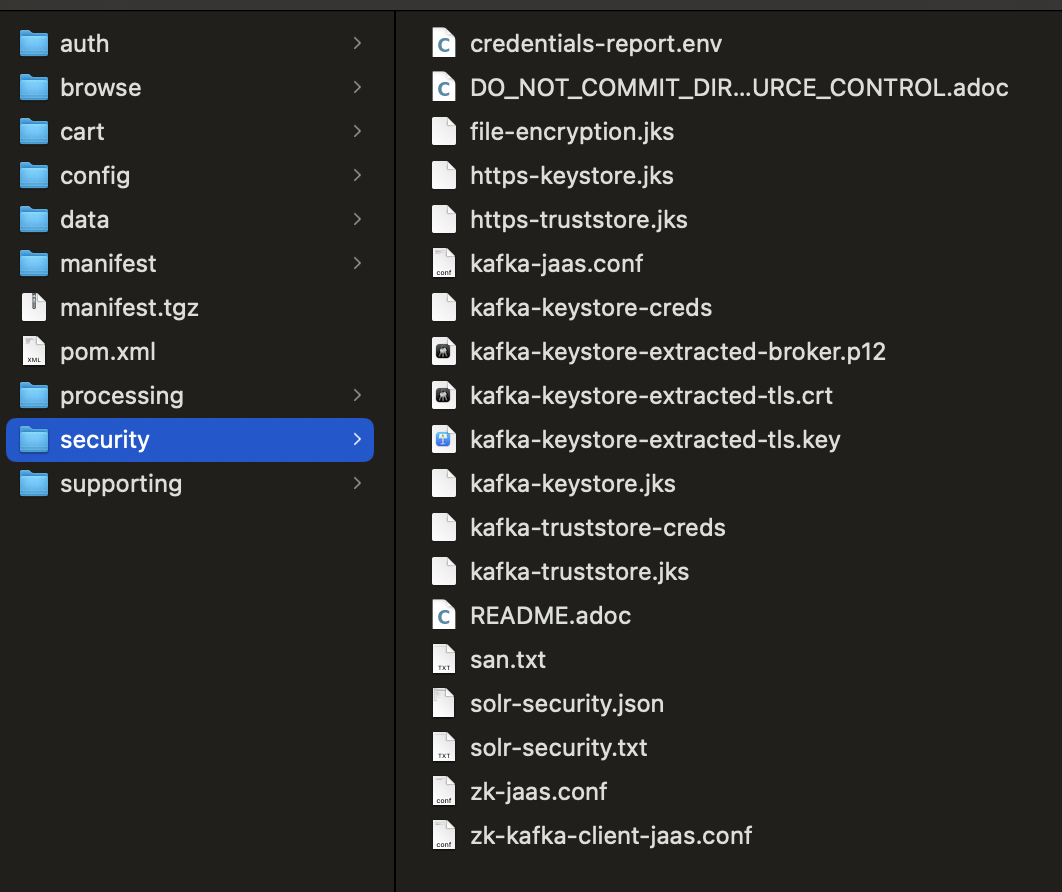
  • Running flex:generate on a KRaft-enabled manifest will automatically produce these additional Security Artifacts:

    • kafka-keystore-extracted-broker.p12

    • kafka-keystore-extracted-tls.crt

    • kafka-keystore-extracted-tls.key

  • If the generated install.sh can’t find the above security artifacts (in the same way it finds the existing broadleaf security artifacts) it will in the process of installing resources go ahead and convert any found kafka-keystore.jks into the appropriate extracted .crt and .key files automatically


General Pre-Installation Checklist

Generate or Update Your Initializr-based Project Manifest to support KRaft + Strimzi

  • choose the latest 2.3.x release train

  • make sure kafka is selected for your message broker

You should see the following new components defined and enabled in your manifest.yml for the generated project.

- name: broker <---- new component enabled
platform: kafka-kraft-broker
descriptor: snippets/docker-kafka-kraft-broker.yml
enabled: true
...
- name: kafka-kraft-controller <---- new component enabled
platform: kafka-kraft-controller
descriptor: snippets/docker-kafka-kraft-controller.yml
enabled: true

(and note that the old kafka broker component will be disabled)

Important
notice that the manifest also specifies the new Alternative SAN to connect to the Strimzi-managed Cluster. If you are deploying to a different namespace, this will need to be updated accordingly.

If you are working with an existing manifest.yml you will want to compare with what was generated above when Kafka + KRaft is enabled and copy over the relevant pieces as necessary.

Run flex:generate to generate new KRaft + Strimzi Security Artifacts

You should notice now that in your generated security folder, you should see all the new Kafka Security Artifacts (that included the updated default Alternative SANs)

Kafka KRaft and Strimzi Security Artifacts
Important
the below instructions are only applicable to installations that wish to utilize an existing credentials-report.env and just replace the Kafka components

Typically, if you are starting from scratch you can just upload all these new security/* artifacts and use these as generated - however, if you have an existing credentials-report.env and you want to only replace the Kafka related security artifacts, you can do the following:

1. Re-generate Security Artifacts based on an EXISTING credentials-report.env

If you already have an existing credentials-report.env you want to keep, delete everything in your security/ directory and put your EXISTING credentials-report.env in there instead. The security directory should be empty except for the credentials-report.env that you just copied into it. Run ./mvnw clean install flex:generate again - this should re-create the contents of the security directory based on your existing credentials-report.env

2. Update/Replace the new Kafka Artifacts to you Secure Vault (e.g. Secrets Manager/Vault)

The primary artifacts you want to replace/update in your existing installation will be:

  • kafka-keystore.jks

  • kafka-keystore-creds

  • kafka-truststore.jks

  • kafka-truststore-creds

  • kafka-jaas.conf

  • updated credentials-report.env > note in the process of re-generating the kafka artifacts, the password for the keystore and truststore also need to be updated and will change

3. Update the truststore password in the secure properties of your config server

Note, because we re-generated new truststore and keystore artifacts, the passwords for these artifacts changed and the encrypted value needs to be updated on the config server. i.e. using the updated credentials-report.env you will want to generate a new set of encrypted secure properties (i.e. config/secure/* ) specifically:

spring:
  cloud:
    stream:
      kafka:
        binder:
          configuration:
            ssl:
              truststore:
                password: '{cipher}{key:version_1}AQCI/MIaDL2x3C+1pqya8...RE-ENCRYPT_AND_UPDATE_ME'

Post-Installation Validation Checklist

After running the updated install.sh, you should verify the following components are healthy in your cluster:

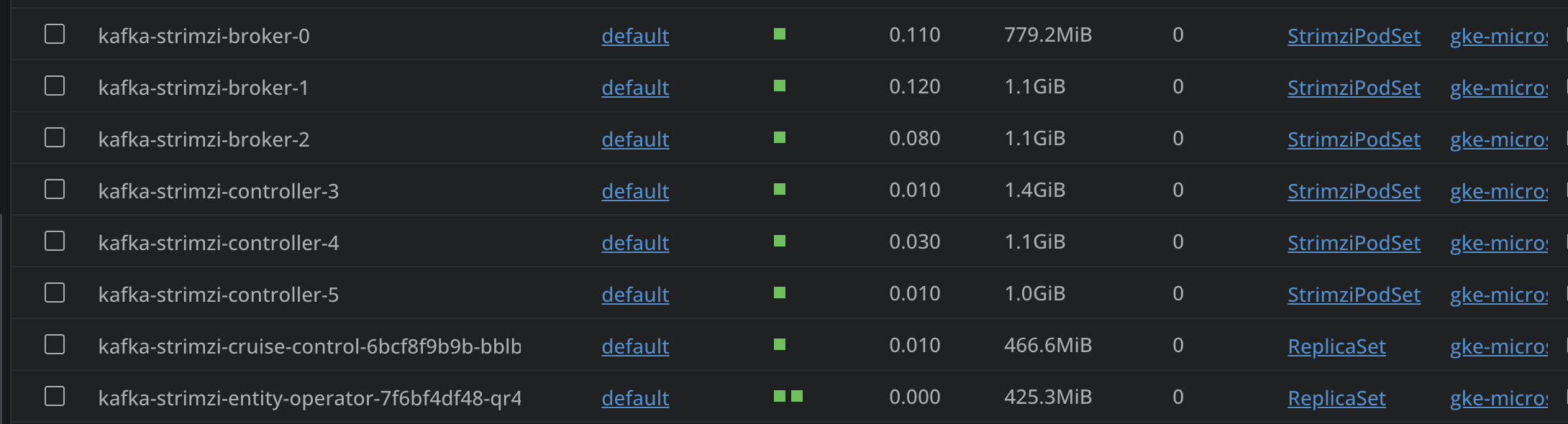
  • Strimzi Cluster Operator: Running in your namespace.

Kafka KRaft Strimzi Cluster Operator
  • Custom Resources: Ensure Kafka Brokers, KRaft Controllers, Cruise Control, and the Entity Operator are all active.

Kafka KRaft Strimzi Custom Resources
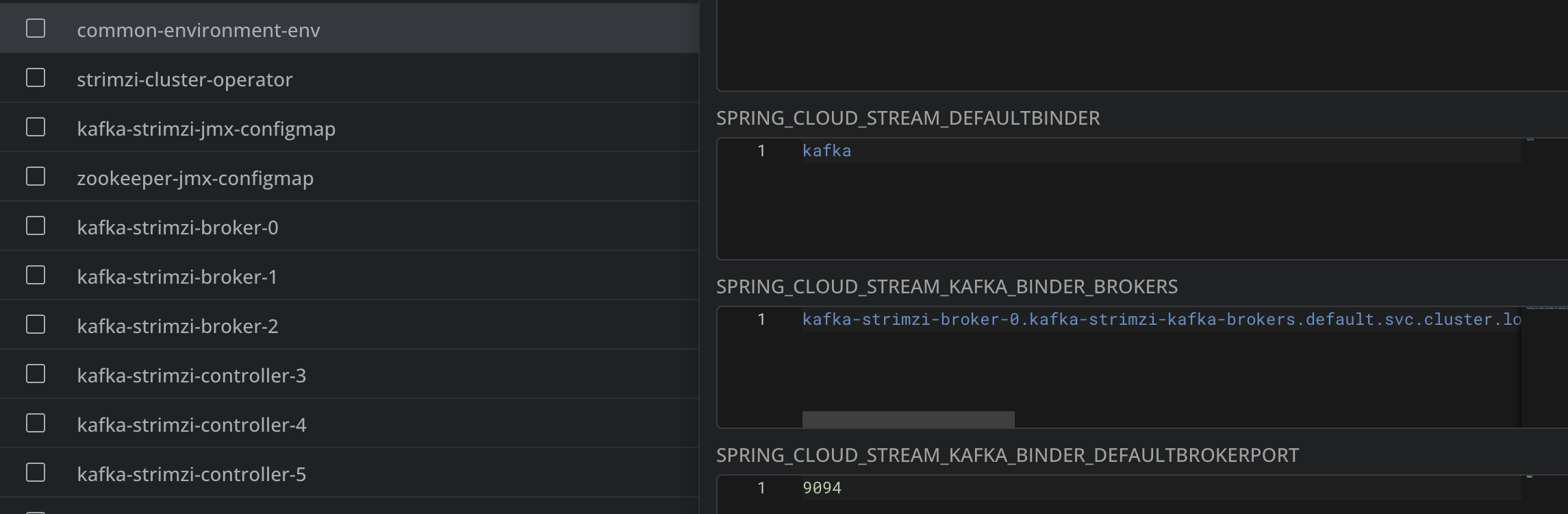
  • ConfigMap Updates: Ensure the common-environment-env ConfigMap is updated with new Strimzi Connection String

Kafka KRaft Strimzi `common-environment-env` ConfigMap
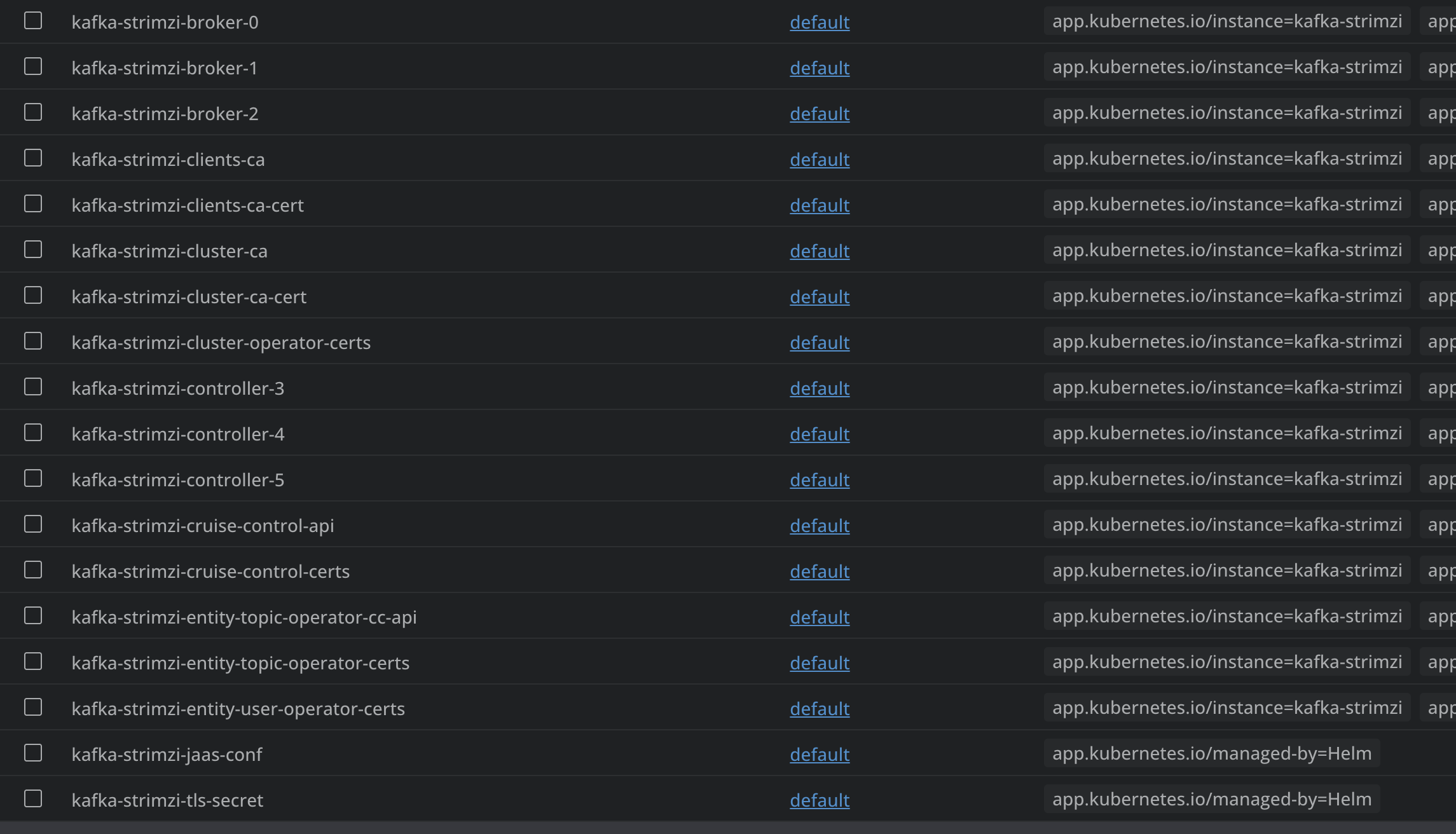
  • Secrets: Ensure a set of new Strimzi Secrets are created

Kafka KRaft Strimzi Secrets
  • Third Party Tools/Metrics: Ensure any third party tooling (e.g. AKHQ) or any metrics gathering dashboards (e.g. Grafana) has been updated with new connection information

  • Optional: Validate Strimzi Operator Usage You can also validate that the Strimzi Operator is working as expected. For example, you can create the following using a Strimzi custom resource:

apiVersion: kafka.strimzi.io/v1beta2
kind: KafkaTopic
metadata:
  name: my-strimzi-topic
  labels:
    strimzi.io/cluster: kafka-strimzi
spec:
  partitions: 1
  replicas: 1
  config:
    retention.ms: 7200000
    segment.bytes: 1073741824

and run kubectl apply -f example-strimzi-kafka-topic.yml

HINT: you can use a tool like AKHQ to verify the creation of your new topic

run kubectl delete -f example-strimzi-kafka-topic.yml to remove the topic