
- v1.0.0-latest-prod
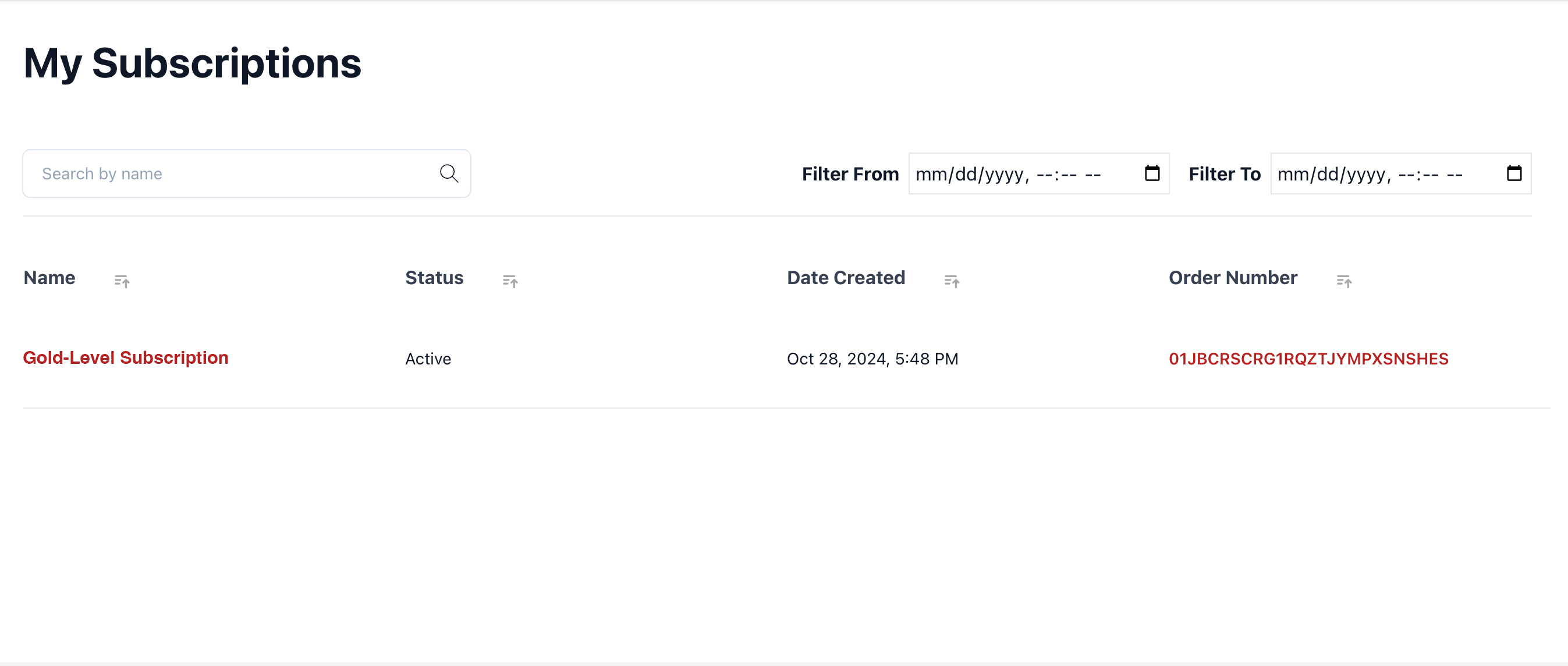
In this walkthrough we will cover building out components to display a User’s subscriptions, view a subscription’s details, change its auto-renewal status, and initiate editing the subscription.
|
Tip
|
See Appendix A: Types for Reference for reference to typescript types involved in new APIs. |
In the demo application, only registered and signed-in users can manage their subscriptions.
The user’s authentication status can be checked using the Broadleaf Auth JS SDK with your AuthClient instance’s isAuthenticated.
If the user is not authenticated, then it will redirect them to sign in if they try to view their subscriptions.
See the Authentication Walkthrough for more info.
After ensuring the user is authenticated, a request should be sent to the Customer or Account Subscription Operation Endpoints, depending on the context, using the CustomerClient or AccountClient respectively.
New methods have been added to these to facilitate subscription operation requests.
These requests result in a page of Subscriptions with their items and allowed actions (e.g., a page of SubscriptionWithItems).
Retrieves a numbered page of subscriptions for a specified customer. The customer must be the owner of the subscriptions
import { authClient } from '/path/to/my-auth-client';
import { customerClient } from '/path/to/my-customer-client';

const customerId = authClient.getIdentityClaims().customer_id;
const accessToken = await authClient.getAccessToken({ scope: 'USER CUSTOMER_USER' });
const query = ''; // derived from a search input
const options = {
  accessToken,
  sort: 'tracking.basicAudit.creationTime,desc',
  params: { cq: `name=eqic='*${query}*'` },
  page: 0,
  size: 10
};
// subscriptions will be a page of SubscriptionWithItems DTOs
const subscriptions = await customerClient.listCustomerSubscriptions(customerId, options);Retrieves a numbered page of subscriptions for a specified account. The account must be the owner of the subscriptions.
import { authClient } from '/path/to/my-auth-client';
import { accountClient } from '/path/to/my-account-client';

const accountId = authClient.getIdentityClaims().acct_id;
const accessToken = await authClient.getAccessToken({ scope: 'USER CUSTOMER_USER' });
const query = ''; // derived from a search input
const options = {
  accessToken,
  sort: 'tracking.basicAudit.creationTime,desc',
  params: { cq: `name=eqic='*${query}*'` },
  page: 0,
  size: 10
};
// subscriptions will be a page of SubscriptionWithItems DTOs
const subscriptions = await accountClient.listAccountSubscriptions(accountId, options);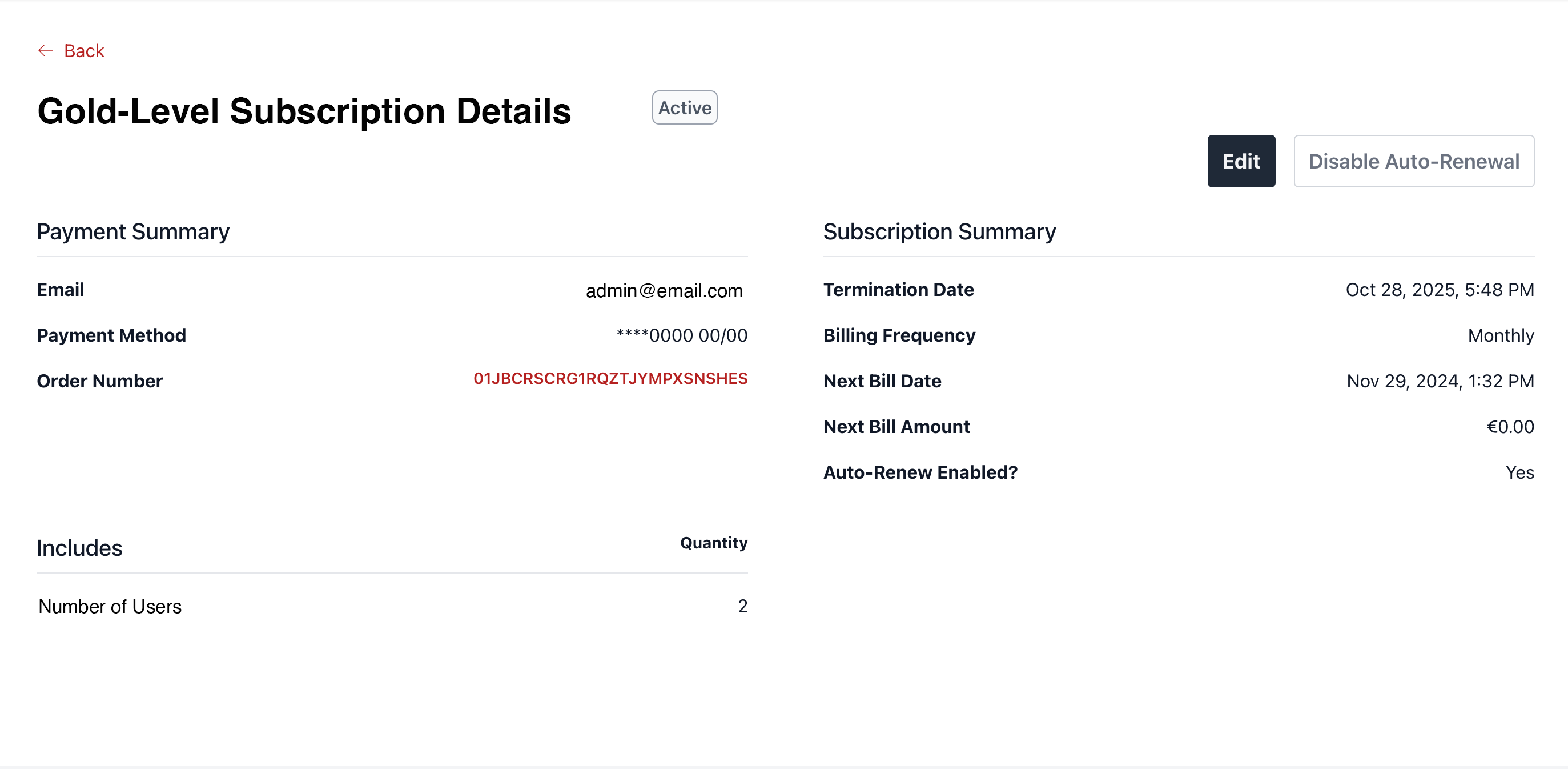
Once a user selects a subscription in the list, then the demo app will redirect them to a details page with a URL that includes the subscription’s ID in the path.
This ID is used on that page to fetch the specific Subscription with its items and allowed actions (e.g., a SubscriptionWithItems).
Methods have been added to the CustomerClient and AccountClient in the Commerce JS SDK.
Retrieves a subscription owned by the customer by its ID.
import { authClient } from '/path/to/my-auth-client';
import { customerClient } from '/path/to/my-customer-client';

const customerId = authClient.getIdentityClaims().customer_id;
const accessToken = await authClient.getAccessToken({ scope: 'USER CUSTOMER_USER' });
const options = {
  accessToken
};
// assuming path like /my-account/subscriptions/:subscriptionId
const subscriptionId = window.location.pathname.split('/')[3];
// will retrieve a SubscriptionWithItems
const subscriptions = await customerClient.getCustomerSubscription(subscriptionId, customerId, options);Retrieves a subscription owned by the customer by its ID.
import { authClient } from '/path/to/my-auth-client';
import { accountClient } from '/path/to/my-account-client';

const accountId = authClient.getIdentityClaims().acct_id;
const accessToken = await authClient.getAccessToken({ scope: 'USER CUSTOMER_USER' });
const options = {
  accessToken
};
// assuming path like /my-account/subscriptions/:subscriptionId
const subscriptionId = window.location.pathname.split('/')[3];
// will retrieve a SubscriptionWithItems
const subscriptions = await accountClient.getAccountSubscription(subscriptionId, accountId, options);Once a Subscription has been retrieved as in the previous section, we can check what actions are allowed to be performed against it by looking at the availableActions property.
For changing the Auto-Renewal status, we are looking for an action with actionType of DefaultSubscriptionActionType#CHANGE_AUTO_RENEWAL.
import { DefaultSubscriptionActionType } from '@broadleaf/commerce-customer';

const isChangeAutoRenewalAllowed = !!subscriptionWithItems.availableActions
  .find(action => action.actionType === DefaultSubscriptionActionType.CHANGE_AUTO_RENEWAL)
If it’s allowed, we can render a button that will enable or disable the auto-renewal status of the subscription based on the flag’s current value.
To get the current value, subscriptionWithItems.subscription.autoRenewalEnabled.
When the button is clicked, it will use the CustomerClient#modifyCustomerSubscription or AccountClient#modifyAccountSubscription to submit the change request.
This API is generic and can handle other actions as well.
// we'll look at how this might be implemented in the next section
import { changeSubscriptionAutoRenewal } './callbacks/change-subscription-auto-renewal';

const ChangeAutoRenewalStatus = props => {
  const {
    refetchSubscription, // a callback to reread the subscription with its items and actions
    subscriptionWithItems: { subscription }
  } = props;
  return (
    <button
      onClick={async () => {
        await changeSubscriptionAutoRenewal(
          subscription.id,
          !subscription.autoRenewalEnabled
        );
        refetch();
      }}
    >
      {subscription.autoRenewalEnabled
        ? 'Disable Auto-Renewal'
        : 'Enable Auto-Renewal'}
    </button>
  );
};Method to modify a subscription’s auto-renewal status for a customer. The customer must own the subscription.
import { authClient } from '/path/to/my-auth-client';
import { customerClient } from '/path/to/my-customer-client';

export const changeSubscriptionAutoRenewal = async (id: string, autoRenewalEnabled: boolean): Promise<void> => {
  const customerId = authClient.getIdentityClaims().customer_id;
  const accessToken = await authClient.getAccessToken({ scope: 'USER CUSTOMER_USER' });
  const options = {
    accessToken
  };
  const request = {
    subscriptionId: id,
    action: {
      actionType: DefaultSubscriptionActionType.CHANGE_AUTO_RENEWAL
    },
    autoRenewalEnabled
  }
  await customerClient.modifyCustomerSubscription(request, customerId, options);
}Method to modify a subscription’s auto-renewal status for an account. The account must own the subscription.
import { authClient } from '/path/to/my-auth-client';
import { accountClient } from '/path/to/my-account-client';

export const changeSubscriptionAutoRenewal = async (id: string, autoRenewalEnabled: boolean): Promise<void> => {
  const accountId = authClient.getIdentityClaims().acct_id;
  const accessToken = await authClient.getAccessToken({ scope: 'USER CUSTOMER_USER' });
  const options = {
    accessToken
  };
  const request = {
    subscriptionId: id,
    action: {
      actionType: DefaultSubscriptionActionType.CHANGE_AUTO_RENEWAL
    },
    autoRenewalEnabled
  }
  await accountClient.modifyAccountSubscription(request, accountId, options);
}Once a Subscription has been retrieved as in the previous section, we can check what actions are allowed to be performed against it by looking at the availableActions property.
For initiating the edit flow, we are looking for an action with actionType of DefaultSubscriptionActionType#EDIT.
import { DefaultSubscriptionActionType } from '@broadleaf/commerce-customer';

const isEditAllowed = !!subscriptionWithItems.availableActions
  .find(action => action.actionType === DefaultSubscriptionActionType.EDIT)
If it’s allowed, we can render a button that will hit the modify-subscription endpoint. For edit, this will create a new named Cart for the Customer or Account with the original subscription and its items already populated and priced. The response will include the cart and the original subscription with its items and available actions.
In the demo, after we get this response, we redirect to an edit page that looks like the subscription’s Product Details Page. From there, we can auto-select the existing subscription add-ons and set the original quantity. Additionally, we can render a button to update the named cart with any changes.
When the button is clicked, it will use the CustomerClient#modifyCustomerSubscription or AccountClient#modifyAccountSubscription to submit the change request.
This API is generic and can handle other actions as well.
// we'll look at how this might be implemented in the next section
import { modifySubscription } './callbacks/modify-subscription';

const ChangeAutoRenewalStatus = props => {
  const {
    subscriptionWithItems: { subscription },
  } = props;
  return (
    <button
      onClick={async () => {
        const request = {
          subscriptionId: subscription.id,
          action: {
            actionType: DefaultSubscriptionActionType.EDIT
          }
        };
        const response = await modifySubscription(request);

        if (!response) {
          // todo handle errors
          return;
        }
        // redirects
        const path = `/my-account/subscriptions/${subscription.id}/edit`;
        const url = new URL(window.location.href);
        url.pathname = path;
        // we can set this in the URL to make sure that cart is resolved
        // or you could have a global cart context that you can update with response.cart instead
        url.searchParams.append('cart', response.cart.id);
        // this will tell the next page the ID of the product to resolve details for
        // you can use the BrowseClient#getProductById to do so
        url.searchParams.append('product', subscription.rootItemRef);
        // redirect
        window.location.href = url.href;
      }}
    >
      {'Edit'}
    </button>
  );
};Method to edit a subscription for a customer. The customer must own the subscription.
import type { ModifySubscriptionRequest, ModifySubscriptionResponse } from '@broadleaf/commerce-customer';
import { authClient } from '/path/to/my-auth-client';
import { customerClient } from '/path/to/my-customer-client';

export const modifySubscription = async (request: ModifySubscriptionRequest):
  Promise<ModifySubscriptionResponse> => {
  const customerId = authClient.getIdentityClaims().customer_id;
  const accessToken = await authClient.getAccessToken({ scope: 'USER CUSTOMER_USER' });
  const options = {
    accessToken
  };
  return await customerClient.modifyCustomerSubscription(request, customerId, options);
}Method to edit a subscription for an account. The account must own the subscription.
import type { ModifySubscriptionRequest, ModifySubscriptionResponse } from '@broadleaf/commerce-customer';
import { authClient } from '/path/to/my-auth-client';
import { accountClient } from '/path/to/my-account-client';

export const modifySubscription = async (request: ModifySubscriptionRequest):
  Promise<ModifySubscriptionResponse> => {
  const accountId = authClient.getIdentityClaims().acct_id;
  const accessToken = await authClient.getAccessToken({ scope: 'USER CUSTOMER_USER' });
  const options = {
    accessToken
  };
  return await accountClient.modifyAccountSubscription(request, accountId, options);
}To update the subscription being editing once it is in the cart, you can use the CartClient#updateItemInCart method.
|
Tip
|
This builds off work for Edit. |
Once a Subscription has been retrieved as in the previous section, we can check what actions are allowed to be performed against it by looking at the availableActions property.
For initiating the upgrade or downgrade flows, we are looking for an action with actionType of DefaultSubscriptionActionType#UPGRADE or DOWNGRADE.
import { DefaultSubscriptionActionType } from '@broadleaf/commerce-customer';

const isUpgradeAllowed = !!subscriptionWithItems.availableActions
  .find(action => action.actionType === DefaultSubscriptionActionType.UPGRADE)
If it’s allowed, we can render a button that will take the user to a selection page where they can choose from the list of upgrades or downgrades.
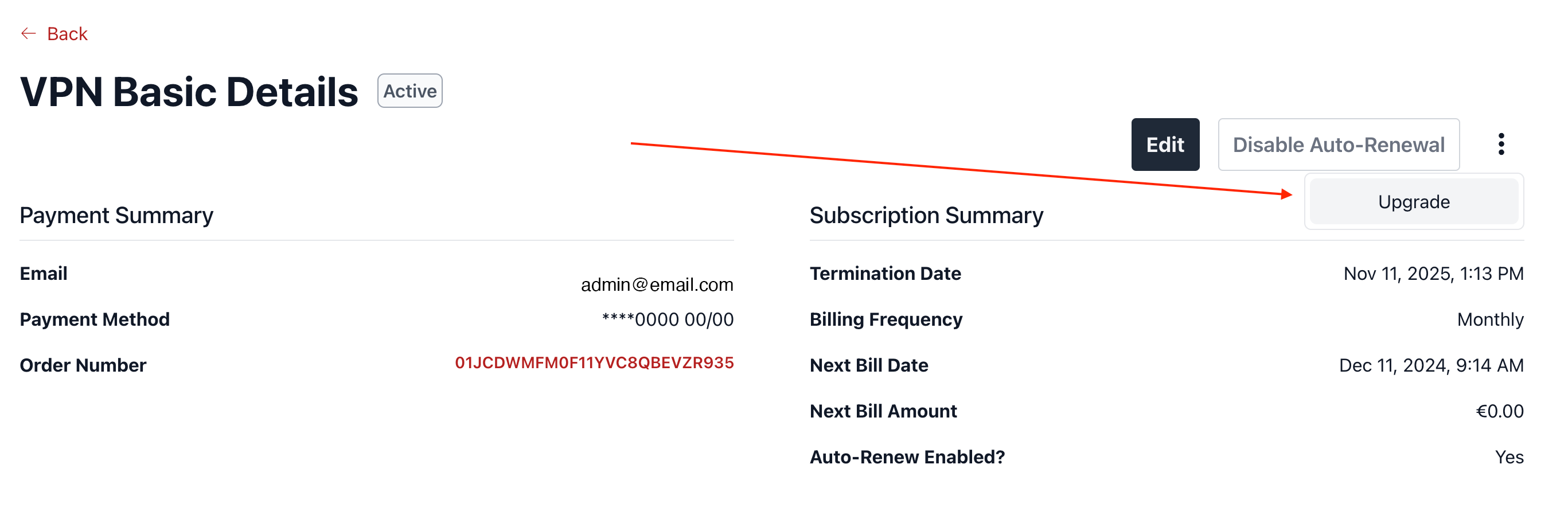
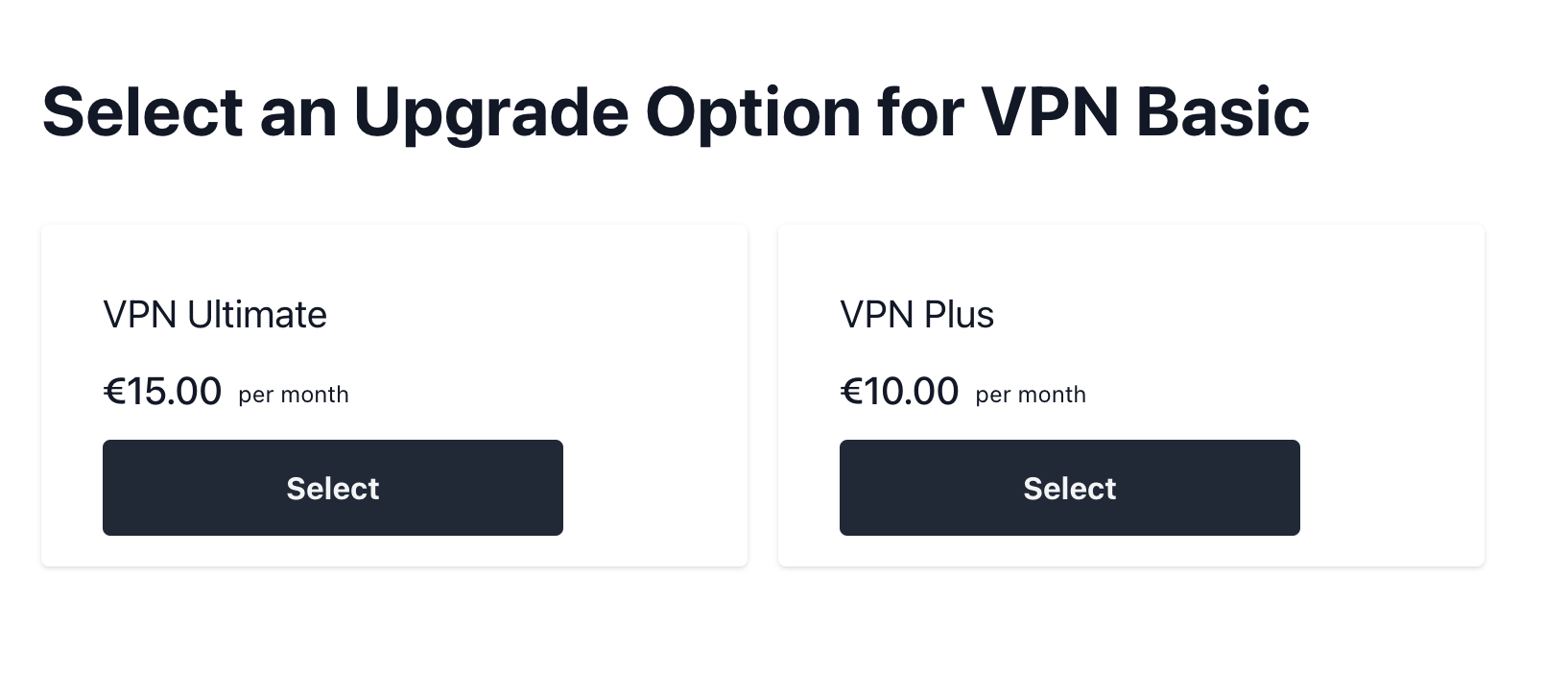
The actions on each option will send a request to the modify-subscription endpoint. For upgrade or downgrade, this will create a new named Cart for the Customer or Account with the original subscription and its items already populated and priced. The response will include the cart and the original subscription with its items and available actions.
In the demo, after we get this response, we redirect to a page that looks like the subscription’s Product Details Page. From there, the user can make additional changes as needed such as selecting new add-ons. Additionally, we can render a button to update the named cart with any changes.
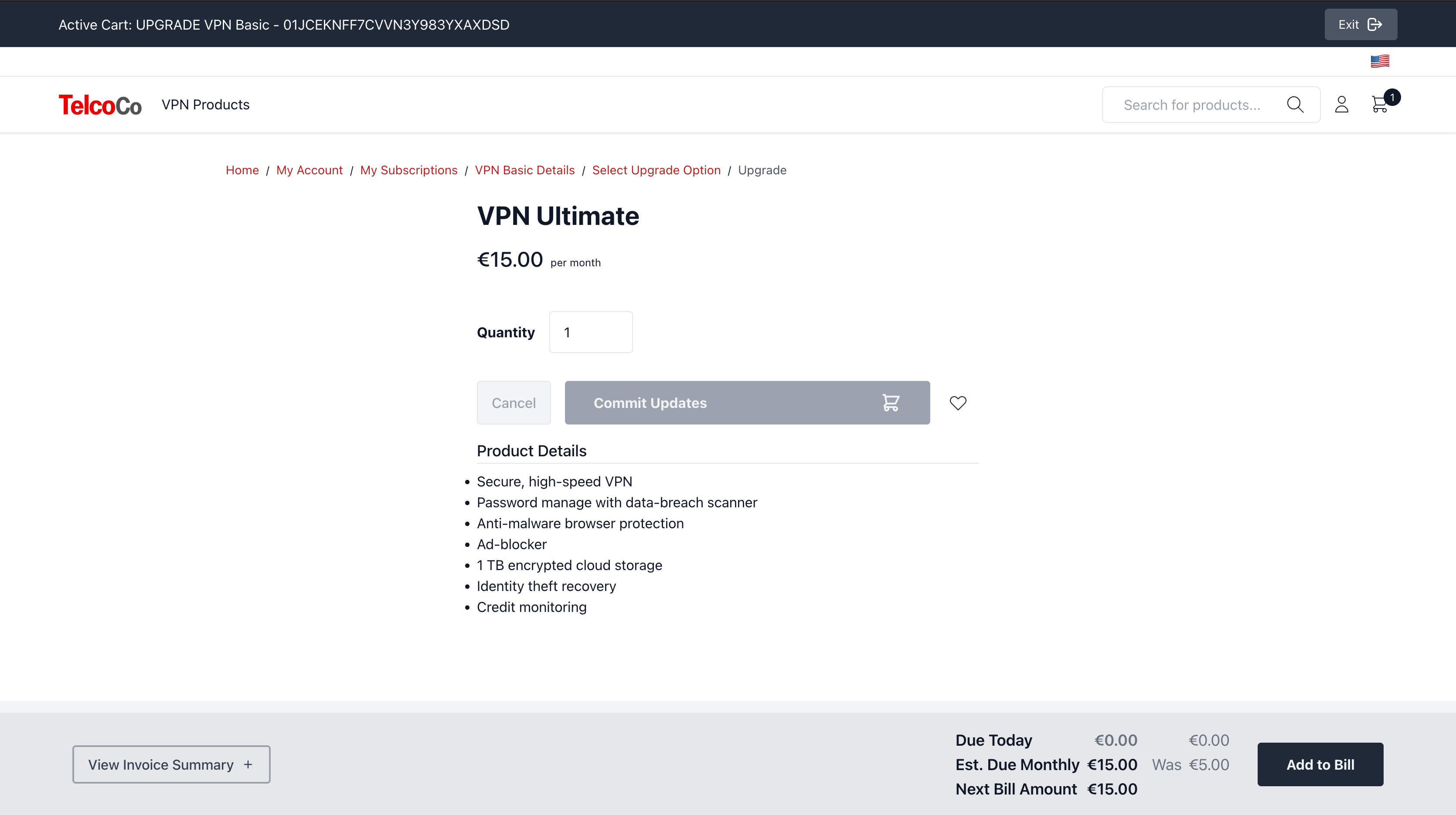
When the button is clicked, it will use the CustomerClient#modifyCustomerSubscription or AccountClient#modifyAccountSubscription to submit the change request.
This API is generic and can handle other actions as well.
import {
  DefaultSubscriptionActionType,
} from '@broadleaf/commerce-customer';

import { modifySubscription } './callbacks/modify-subscription';

const UpgradeDowngradeButton = props => {
  const {
    action,
    subscriptionWithItems: { subscription },
  } = props;
  const isUpgrade = action.actionType === DefaultSubscriptionActionType.UPGRADE;
  return (
    <button
      onClick={async () => {
          const path = `/my-account/subscriptions/${subscription.id}/${isUpgrade ? 'upgrade' : 'downgrade'}`;
          const url = new URL(window.location.href);
          url.pathname = path;
          // the root subscription item's ref (usually ID), so we can look it up on the selection page
          url.searchParams.append('rootItemRef', subscription.rootItemRef);
          // find the options and put them in the URL so we can look them up on the selection page
          if (action?.actionInfo?.['upgradeOptions']) {
            let upgradeOptions: Array<string>;
            if (Array.isArray(action.actionInfo['upgradeOptions'])) {
              upgradeOptions = action.actionInfo['upgradeOptions'];
            } else {
              upgradeOptions = [action.actionInfo['upgradeOptions'] as string];
            }
            upgradeOptions.forEach(option => {
              url.searchParams.append('upgradeOptions', option);
            });
          }

          // find the options and put them in the URL so we can look them up on the selection page
          if (action?.actionInfo?.['downgradeOptions']) {
            let downgradeOptions: Array<string>;
            if (Array.isArray(action.actionInfo['downgradeOptions'])) {
              downgradeOptions = action.actionInfo['downgradeOptions'];
            } else {
              downgradeOptions = [
                action.actionInfo['downgradeOptions'] as string
              ];
            }
            downgradeOptions.forEach(option => {
              url.searchParams.append('downgradeOptions', option);
            });
          }
          // redirect to the selection page
          window.location.href = url.href;
    >
      {isUpgrade ? 'Upgrade' : 'Downgrade'}
    </button>
  );
};import { type FC } from 'react';
import { type Product } from '@broadleaf/commerce-browse';
import {
DefaultSubscriptionActionType,
type SubscriptionWithItems,
} from '@broadleaf/commerce-customer';
import { modifySubscription } './callbacks/modify-subscription';
interface UpgradeDowngradeOptionProps {
actionType:
| DefaultSubscriptionActionType.UPGRADE
| DefaultSubscriptionActionType.DOWNGRADE;
option: Product;
subscription: SubscriptionWithItems;
loading?: boolean;
}
export const UpgradeDowngradeOption: FC<
UpgradeDowngradeOptionProps
> = props => {
const {
actionType,
loading = false,
option,
subscription: { subscription },
} = props;
const primaryAsset = option.primaryAsset;
const name = option.name;
const src = primaryAsset?.contentUrl;
const url = `/my-account/subscriptions/${subscription.id}/${actionType.toLowerCase()}/${option.id}`;
return (
<li className="flex w-full flex-col space-y-4 rounded px-8 py-4 shadow">
<section className="relative overflow-hidden">
{primaryAsset && (
<div className="relative block h-[280px] transform transition duration-500 hover:scale-105 sm:h-[40vh]">
<img
alt={primaryAsset.altText}
className="h-full w-full object-contain"
src={src}
title={primaryAsset.title}
/>
</div>
)}
</section>
<h3 className="mb-1 mt-4 line-clamp-1 break-all text-xl">
{name}
</h3>
{!!option.priceInfo && (
<ProductPrice
loading={loading}
priceInfo={option.priceInfo}
size="sm"
/>
)}
<button
className="w-60"
onClick={async () => {
// similar to EDIT but specifying the item ref and item type of the selected
// upgrade option, e.g., `BLC_PRODUCT` and a product ID
const response = await modifySubscription({
subscriptionId: subscription.id,
action: { actionType },
newItemRefType: subscription.rootItemRefType,
newItemRef: option.id,
});
// redirect to screen just like a PDP and specify the new Cart ID so we can resolve it there
window.location.pathname = `${window.location.origin}${url}?cart=${response.cart.id}`;
}}
type="button"
>
Select
</button>
</li>
);
};/**
* A combined DTO containing a <<Subscription> and its <<SubscriptionItem, Items>>.
*/
export interface SubscriptionWithItems {
/** The subscription */
subscription: Subscription;
/** The subscription's items */
subscriptionItems: Array<SubscriptionItem>;
/** The available actions a user can perform against the <<Subscription>> */
availableActions: Array<SubscriptionAction>;
/**
* The reason why an action is not available.
*
* <<DefaultSubscriptionActionUnavailableReasons (Enum),See DefaultSubscriptionActionUnavailableReasons>>.
*/
unavailableReasonsByActionType: Record<string, Array<string>>;
}/**
* Represents a line item for a <<Subscription>>.
*/
export interface SubscriptionItem {
/** ID of the item. */
id: string;
/** ID of the parent <<Subscription>> */
subscriptionId: string;
/** Name of the subscription item */
itemName: string;
/** Type of catalog item referenced by this subscription item */
itemRefType: DefaultSubscriptionItemRefType | string;
/** Reference to the catalog item represented by this subscription item */
itemRef: string;
/** The `#itemRefType` of this subscription item's parent if it's a dependent */
parentItemRefType?: DefaultSubscriptionItemRefType | string;
/** The `#itemRef` of this subscription item's parent if it's a dependent */
parentItemRef?: string;
/** The price of a single quantity of this subscription item */
itemUnitPrice: number;
/** The quantity purchased of this item */
quantity: number;
/** Whether the item is taxable */
taxable: boolean;
/** The tax category if taxable */
taxCategory?: string;
/** The comma-separate list of nexus codes if taxable */
taxNexus?: string;
/** Whether this item is archived */
archived: boolean;
/** If archived, this is the reason */
archiveReason?: string;
/** List of adjustments applied to this item from promotions */
subscriptionItemAdjustments: Array<SubscriptionItemAdjustment>;
}/**
* Describes an action that a user can make against a <<Subscription>>.
*/
export interface SubscriptionAction {
/**
* The type of action.
*
* <<DefaultSubscriptionActionType (Enum),See DefaultSubscriptionActionType>>.
*/
actionType: DefaultSubscriptionActionType | string;
/** Additional info related to the action */
actionInfo?: Record<string, unknown>;
}/**
* The default possible reason that a user cannot perform an action against a <<Subscription>>.
*/
export enum DefaultSubscriptionActionUnavailableReasons {
/**
* The user doesn't have sufficient permissions to perform the action against this subscription.
*/
INSUFFICIENT_PERMISSIONS = 'INSUFFICIENT_PERMISSIONS',
/**
* There is no upgrade available for this subscription.
*/
NO_UPGRADE_AVAILABLE = 'NO_UPGRADE_AVAILABLE',
/**
* There is no downgrade available for this subscription.
*/
NO_DOWNGRADE_AVAILABLE = 'NO_DOWNGRADE_AVAILABLE',
/**
* A generic reason for something like can't change auto-renewal for subscriptions with
* multi-year terms.
*/
ACTION_NOT_ALLOWED = 'ACTION_NOT_ALLOWED',
/**
* The subscription is in an incorrect state for the given action.
*
* For example, you can only `RESUME` a `PAUSED` subscription, and you can only
* `REACTIVATE` a `TERMINATED` subscription.
*
* <<DefaultSubscriptionActionType (Enum),See DefaultSubscriptionActionType>>.
*/
INCORRECT_STATE = 'INCORRECT_STATE',
/**
* The subscription cannot be cancelled because its cancellation-policy does not allow so.
*
* <<DefaultSubscriptionActionType (Enum),See DefaultSubscriptionActionType>>.
*/
CANCELLATION_POLICY = 'CANCELLATION_POLICY'
}/**
* The default possible actions that a user can perform against a <<Subscription>>.
*/
export enum DefaultSubscriptionActionType {
/**
* Whether the user can edit this subscription.
*/
EDIT = 'EDIT',
/**
* Whether the user can change the auto-renewal value for this subscription.
*/
CHANGE_AUTO_RENEWAL = 'CHANGE_AUTO_RENEWAL',
/**
* Whether the user can upgrade this subscription.
*/
UPGRADE = 'UPGRADE',
/**
* Whether the user can downgrade this subscription.
*/
DOWNGRADE = 'DOWNGRADE',
/**
* Whether the user can cancel this subscription.
*/
CANCEL = 'CANCEL'
}/**
* Represents a request to modify a <<Subscription>>.
*/
export interface ModifySubscriptionRequest {
/** ID of the subscription to change */
subscriptionId: string;
/** <<SubscriptionAction>> representing the type of modification */
action: SubscriptionAction;
/** The new value to set the auto-renewal flag to on the subscription */
autoRenewalEnabled?: boolean;
/** Whether to cancel the subscription immediately */
immediateCancellation?: boolean;
/** The new subscription to upgrade/downgrade to */
newItemRef?: string;
/** The type of reference for `newItemRef` */
newItemRefType?: DefaultSubscriptionItemRefType | string;
/** The reason for the action */
reason?: string;
/** Additional attributes */
[key: string]: unknown;
}/**
* Represents a response to a <<ModifySubscriptionRequest>>.
*/
export interface ModifySubscriptionResponse {
/** A cart created with for the subscription when editing, upgrading, or downgrading */
cart?: {
id: string;
[key: string]: unknown;
};
/** The updated <<SubscriptionWithItems>> */
subscription?: SubscriptionWithItems;
}