
- v1.0.0-latest-prod
This document is all about setting up backend data in preparation for selling subscription products. This includes catalog configuration, pricing configuration, and offer configuration.
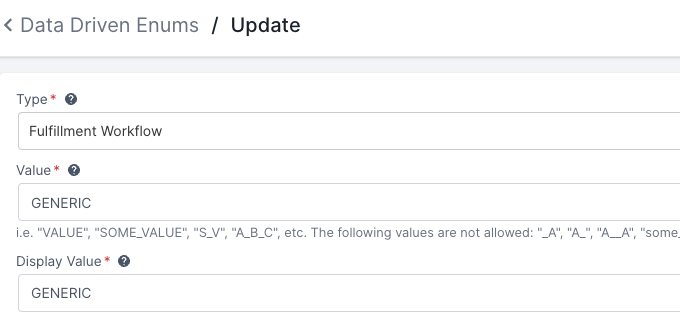
Broadleaf added out-of-the-box domain support for subscription-related settings and fulfillment workflows. Subscription products are intended to be based on STANDARD & MERCHANDISING_PRODUCT-typed Products.
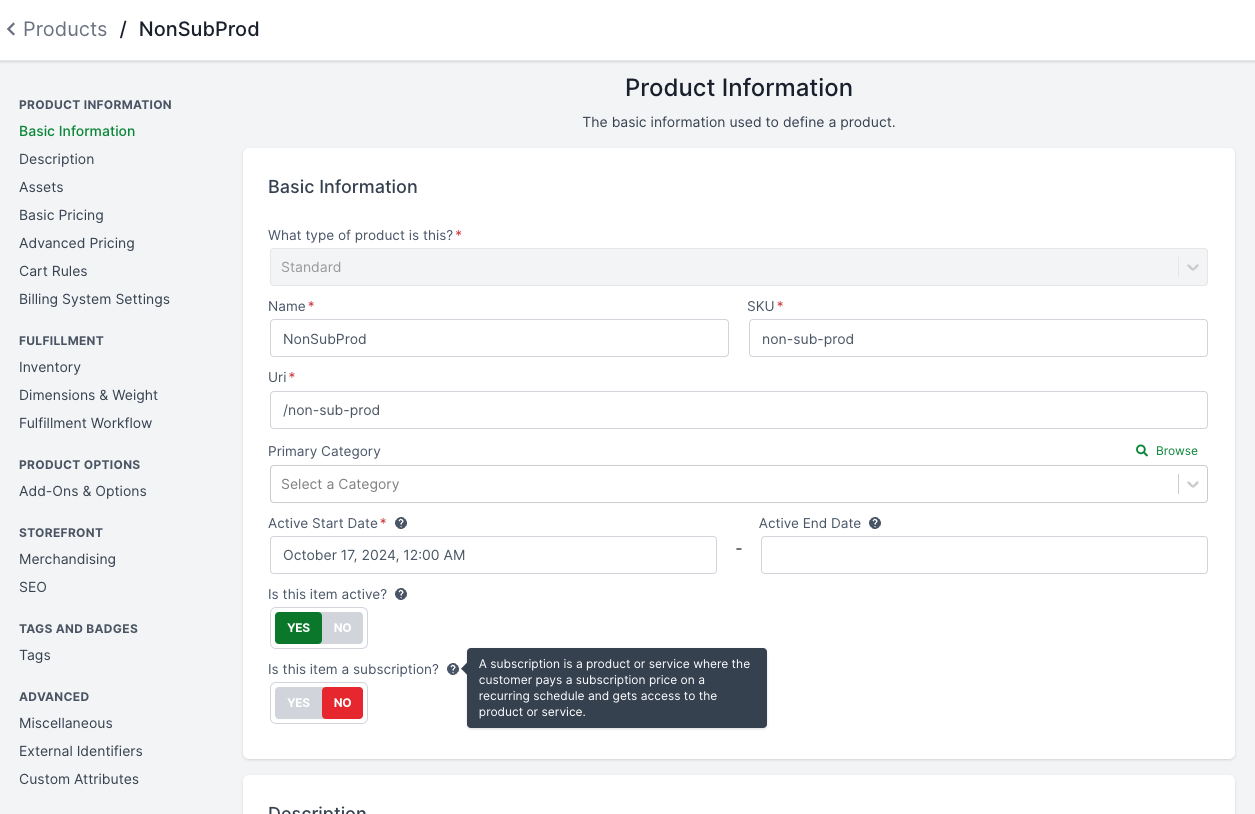
The Product entity has been enhanced with several fields to support subscription behavior.
isSubscription flagMarks the product as a subscription, enabling subscription-specific logic and UI options.
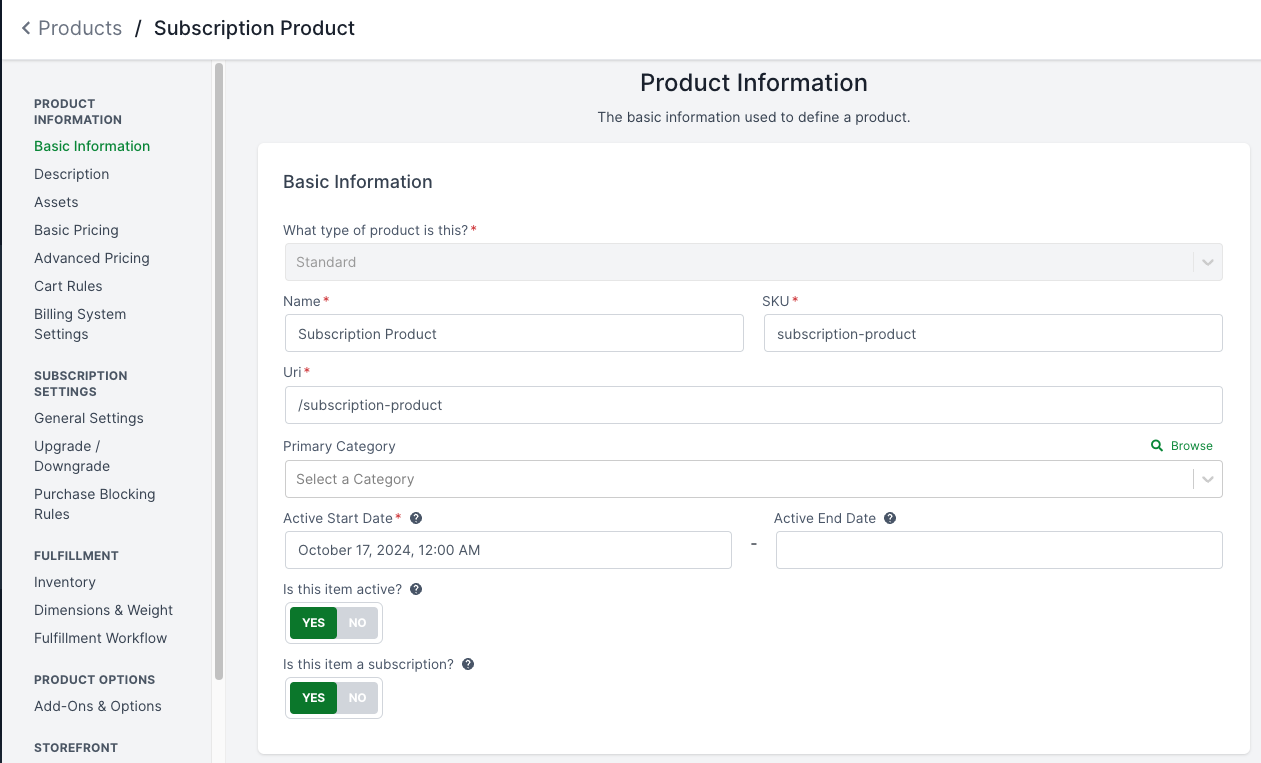
When the isSubscription flag is enabled, the following subscription-related fields are revealed:
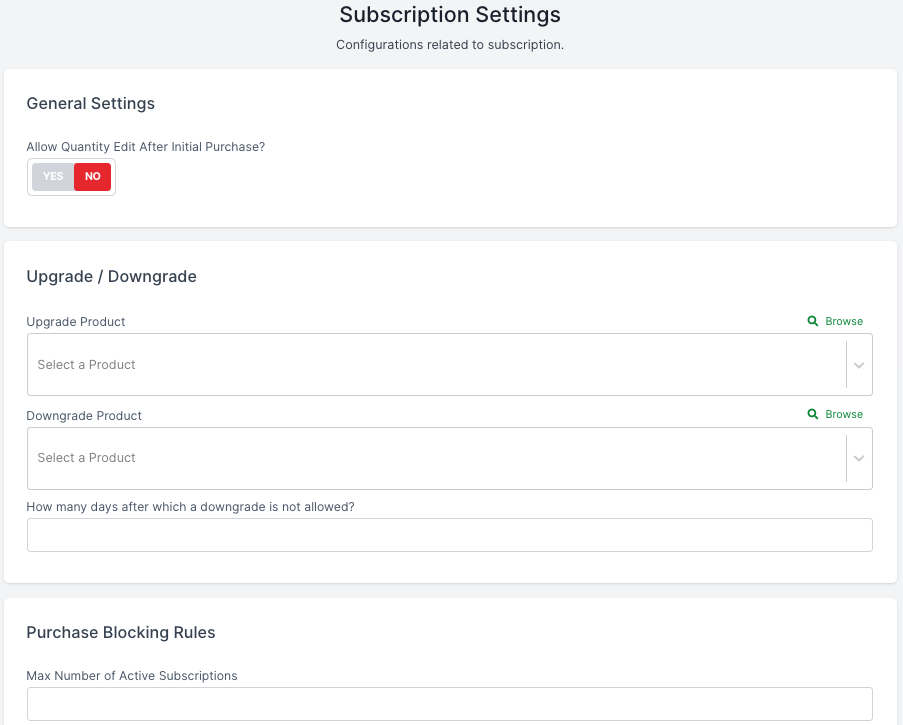
maxNumberOfActiveSubscriptions - Limits the maximum number of active subscriptions a customer can hold for this product.
allowQtyEditAfterInitialPurchase - Determines whether the quantity of this subscription can be edited after the initial purchase. (Defaults to false)
restrictDowngradeAfterDays - Specifies the number of days after which downgrading the subscription is restricted. This restriction resets at the start of a new billing cycle.
allowChangingBillingFrequency - Determines whether the customer can change the billing frequency after the initial purchase. (Defaults to false)
cancellationPolicyRef - A reference to the cancellation policy that dictates how this subscription can be cancelled.
upgradeProductIds - References the IDs of the products this subscription can be upgraded to.
downgradeProductIds - References the IDs of the products this subscription can be downgraded to.
autoRenewalEnabled - Indicates whether this subscription should auto-renew by default.
allowAutoRenewalModification - Indicates whether the customer can opt in and out of auto-renewal.
The ProductTerm entity has also been enhanced for subscription terms:
endOfTermStrategy - Defines the strategy to use at the end of the term (e.g., AUTO_RENEW, CANCEL).
allowEndOfTermStrategyModification - Indicates whether the customer can modify the end-of-term strategy.
The ItemChoice entity (used for add-ons) has been enhanced to support subscription add-ons.
Regardless of what the parent product’s isSubscription flag is set to, an add-on can still be a subscription add-on.
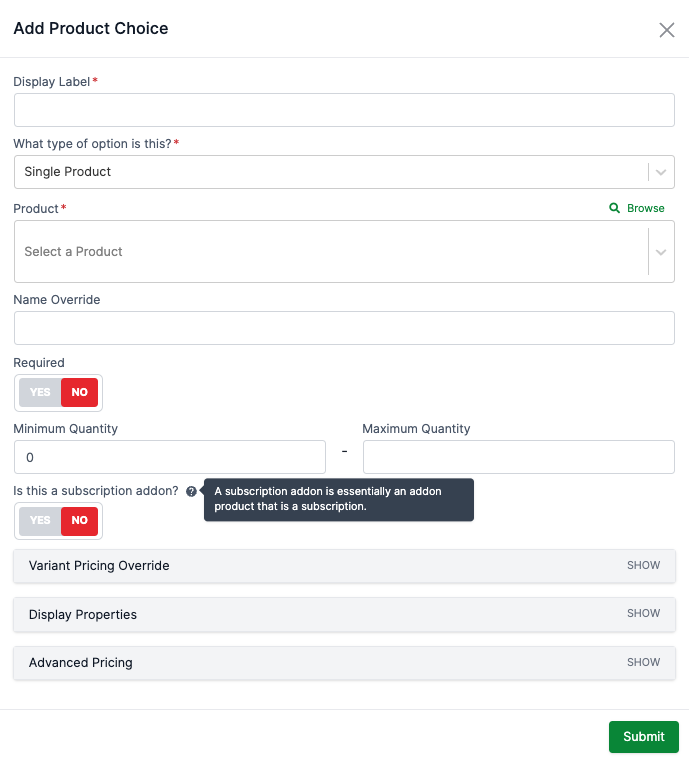
The add-on’s isSubscription flag will also show/hide the subscription-related settings.
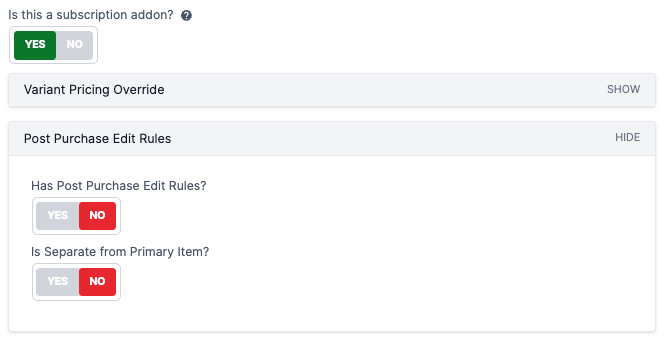
isSubscription - Marks the add-on itself as a subscription. (Defaults to false)
isSeparateFromPrimaryItem - Indicates if this add-on should be managed as a separate line item from its parent. (Defaults to false)
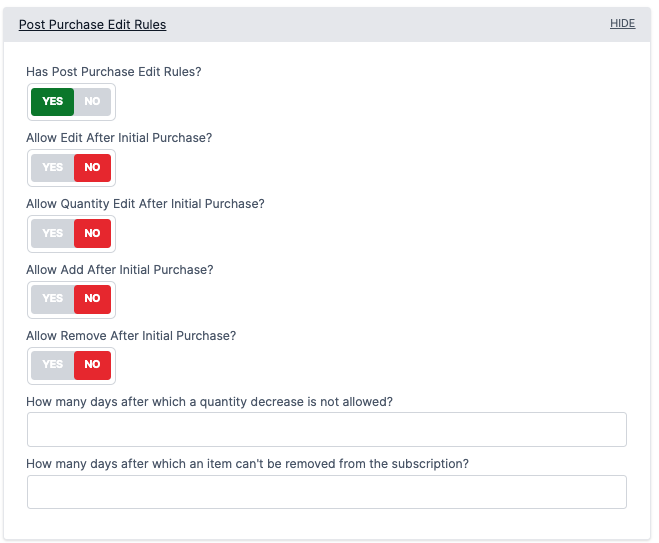
hasPostPurchaseEditRules - Enables the evaluation of post-purchase edit rules for this add-on. (Defaults to false)
allowEditAfterInitialPurchase - Allows general editing of the add-on after the initial purchase. (Defaults to false)
allowQtyEditAfterInitialPurchase - Allows the quantity of the add-on to be edited after the initial purchase. (Defaults to false)
allowAddAfterInitialPurchase - Allows this add-on to be added to an existing subscription after the initial purchase. (Defaults to false)
allowRemoveAfterInitialPurchase - Allows this add-on to be removed from an existing subscription after the initial purchase. (Defaults to false)
restrictQtyDecreaseAfterDays - Specifies the number of days after which decreasing the quantity of the add-on is restricted.
restrictRemovalAfterDays - Specifies the number of days after which removing the add-on is restricted.
|
Note
|
The individual post-purchase edit rules are shown/hidden based on the hasPostPurchaseEditRules flag. The post-purchase edit rules (e.g. allow edit after initial purchase) are set back to false & null (for the integer fields) when either the hasPostPurchaseEditRules flag or the isSubscription flag is set to false.
|
Broadleaf added framework support to allow term-based pricing with multiple frequencies.
To configure a product to have term-based pricing, you can add the available terms in the Advanced Pricing → Advanced Pricing section. For example, one of our sample products has 1-Month, 1-Year, and 2-Year terms:
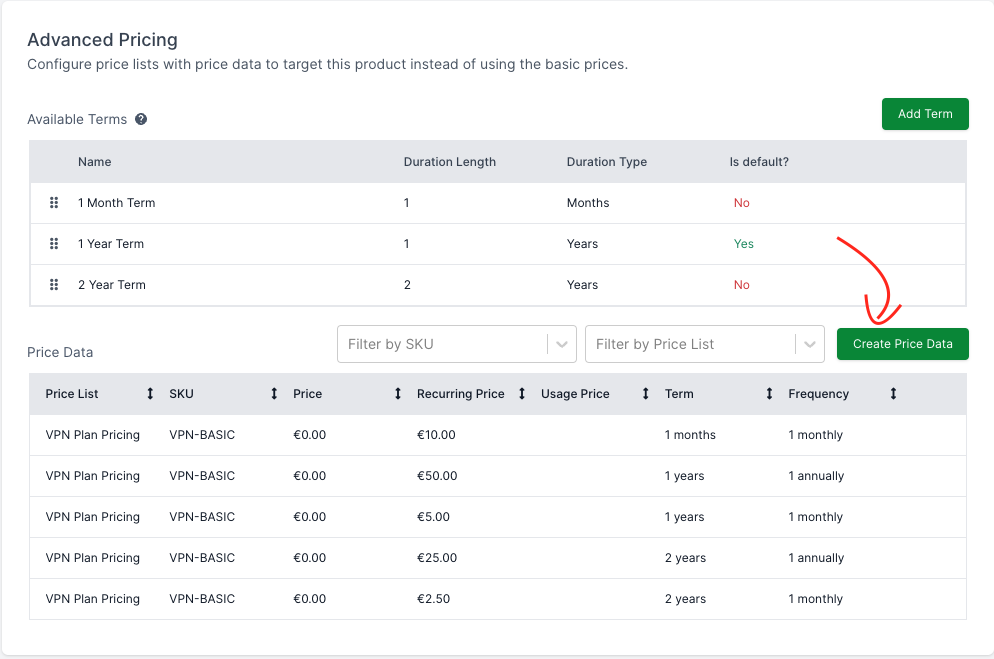
These terms configurations will help drive different frequency options in the storefront to retrieve specific pricing.
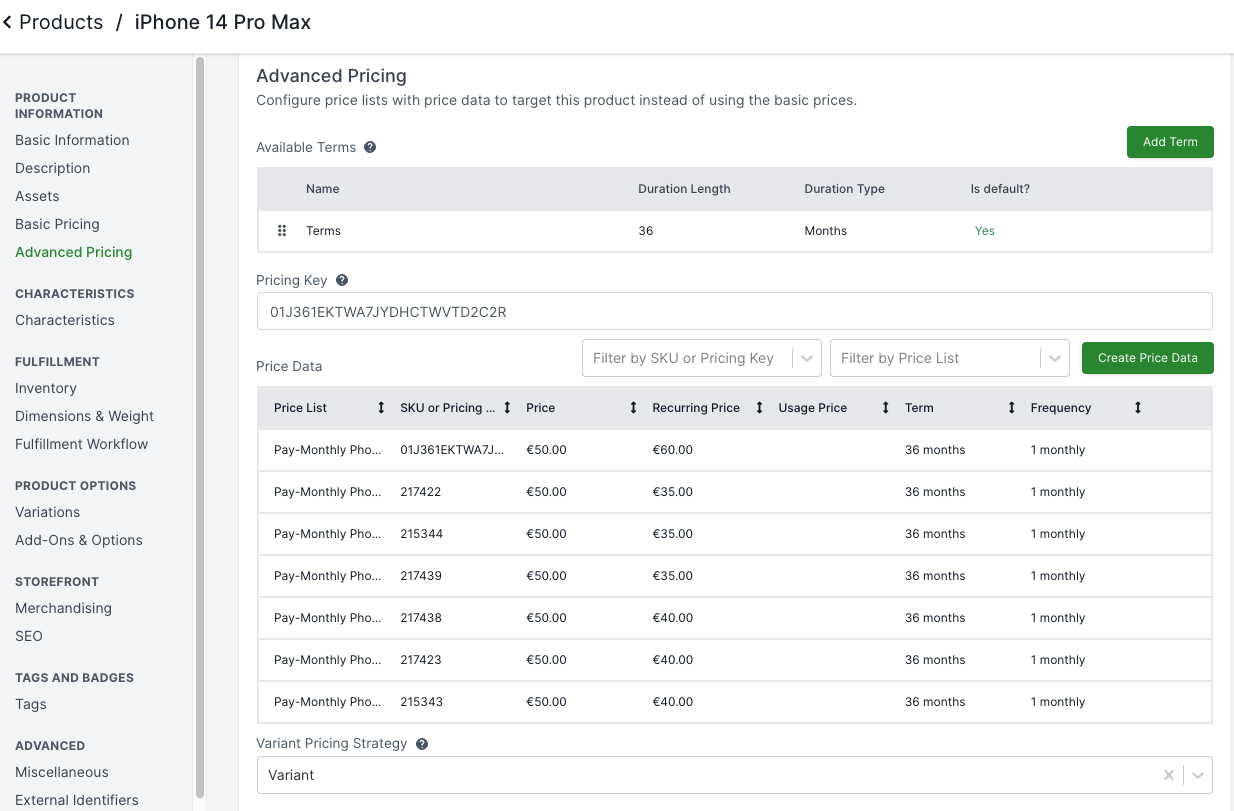
PriceData can be added to specify the pricing for each term and frequency combination, which can be done in the same Advanced Pricing section in the Product management page (see below) or in the PriceList management page (see later section):
|
Note
|
There can only be one unique PriceData per PriceList for the same target, term, and frequency combination. |
The term-based pricing needs to be added to a PriceList, which can be managed in Pricing → Price Lists section. In here, you can add as many PriceLists as needed to align with your pricing scopes/variations.
Each PriceData specifies the price for a unique target, term, and frequency combination.
Once the target is specified, the pricing-related details are required. First, the payment strategy must be specified, which can be ONE_TIME, PREPAID, or POSTPAID, each option driving different configuration requirements.
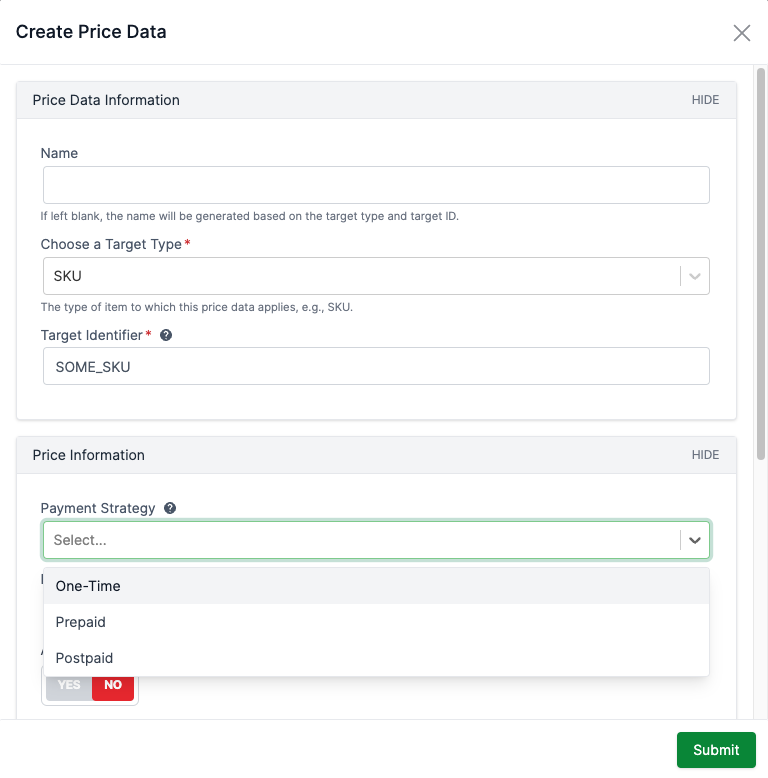
Once a payment strategy is selected, take POSTPAID as an example, you can then specify the recurring price, frequency, and term:
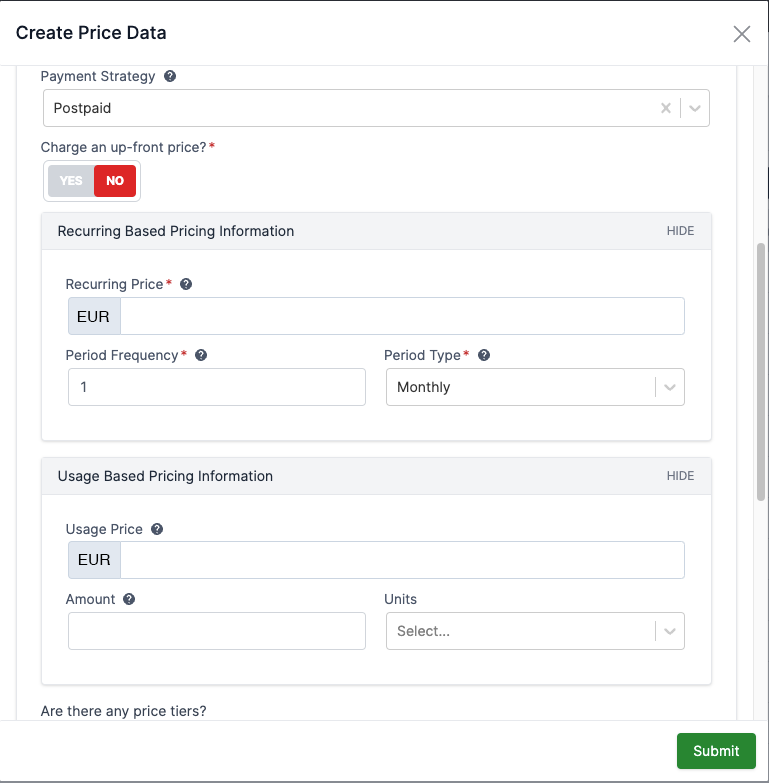
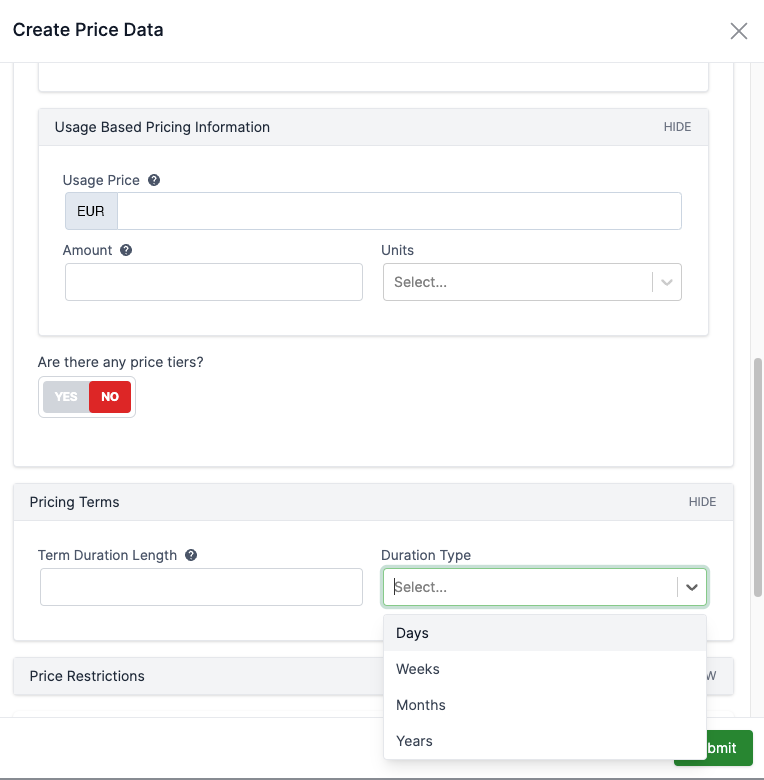
As part of our demo data, we added some example term-based pricing for the VPN Products:
The VPN Plan Pricing PriceList (Euro) has:
VPN Basic:
1 month term, monthly: 10
1 year
monthly: 5
annually: 50 (2 months free)
2 year
monthly: 2.5
annually: 25 (2 months free)
VPN Plus:
1 month term, monthly: 20
1 year
monthly: 10
annually: 100 (2 months free)
2 year
monthly: 5
annually: 50 (2 months free)
VPN Ultimate:
1 month term, monthly: 30
1 year
monthly: 15
annually: 150 (2 months free)
2 year
monthly: 7.5
annually: 75 (2 months free)
When requesting prices for a target (e.g. SKU), the system will return the best matched PriceData for the target.
The system evaluates all PriceData that exactly match the target’s requested characteristics, term, frequency, and payment strategy.
If multiple matching PriceData are available (e.g. from different PriceLists), they are prioritized by the following criteria (in order):
Currency: The PriceData that matches the requested currency wins
Priority: Lowest numeric value first (e.g. 1 is higher priority than 10)
If the prices are still equivalent, it falls back to PriceData#PRICE_DATA_COMPARATOR:
Vendor Reference: Nulls last
Terms: Nulls last
Note: At this point of the logic, the terms are equivalent
Number of Characteristics: More is better (reverse order)
Note: At this point of the logic, the characteristics are equivalent
Upfront Price: Lowest first
Recurring Price: Lowest first
Payment Strategy: ONE_TIME > POSTPAID > PREPAID
Note: At this point of the logic, the payment strategies are equivalent
Usage Price: Lowest first
You can find the exact matching logic in com.broadleafcommerce.pricing.service.DefaultPriceInfoService#putPricesForType and com.broadleafcommerce.pricing.service.DefaultPriceInfoService#getBestPriceFromPriceLists.
The /browse/price-targets endpoint also supports requesting all the available frequencies based on the given term, by specifying getAllAvailableFrequencies to true in the X-Price-Info-Context header.
For example, if we request all the available frequencies for the VPN-BASIC target (see the Sample PriceData section for the setup) with the following cURL request, we would get the PriceData for both 1 Monthly and 1 Annually frequencies for the 2-Year term:
curl --location 'https://sample.localhost:8456/api/catalog-browse/browse/price-targets' \
--header 'Accept: application/json' \
--header 'Content-Type: application/json' \
--header 'Origin: https://sample.localhost:8456' \
--header 'X-Application-Token: SAMPLE' \
--header 'X-Price-Context: {"locale":"en-US","currency":"EUR"}' \
--header 'X-Price-Info-Context: {"getAllAvailableFrequencies": true}' \
--data '{
    "targetsMap": {
        "VPN-EXTREME": [
            {
                "targetType": "SKU",
                "targetId": "VPN-BASIC",
                "priceableFields": {
                    "basePrice": 10
                },
                "termDurationLength": 2,
                "termDurationType": "YEARS"
            }
        ]
    }
}'Only relevant for subscriptions. These periods determine when the adjustments are applicable to the subscription.
Note that these periods align with the Broadleaf Subscription Periods.
For example, for an "All Products 50% off for the first 3 months for monthly subscriptions" offer, the begin period would be 1 and the end period would be 3, representing that the offer is applicable for month 1, 2, and 3.
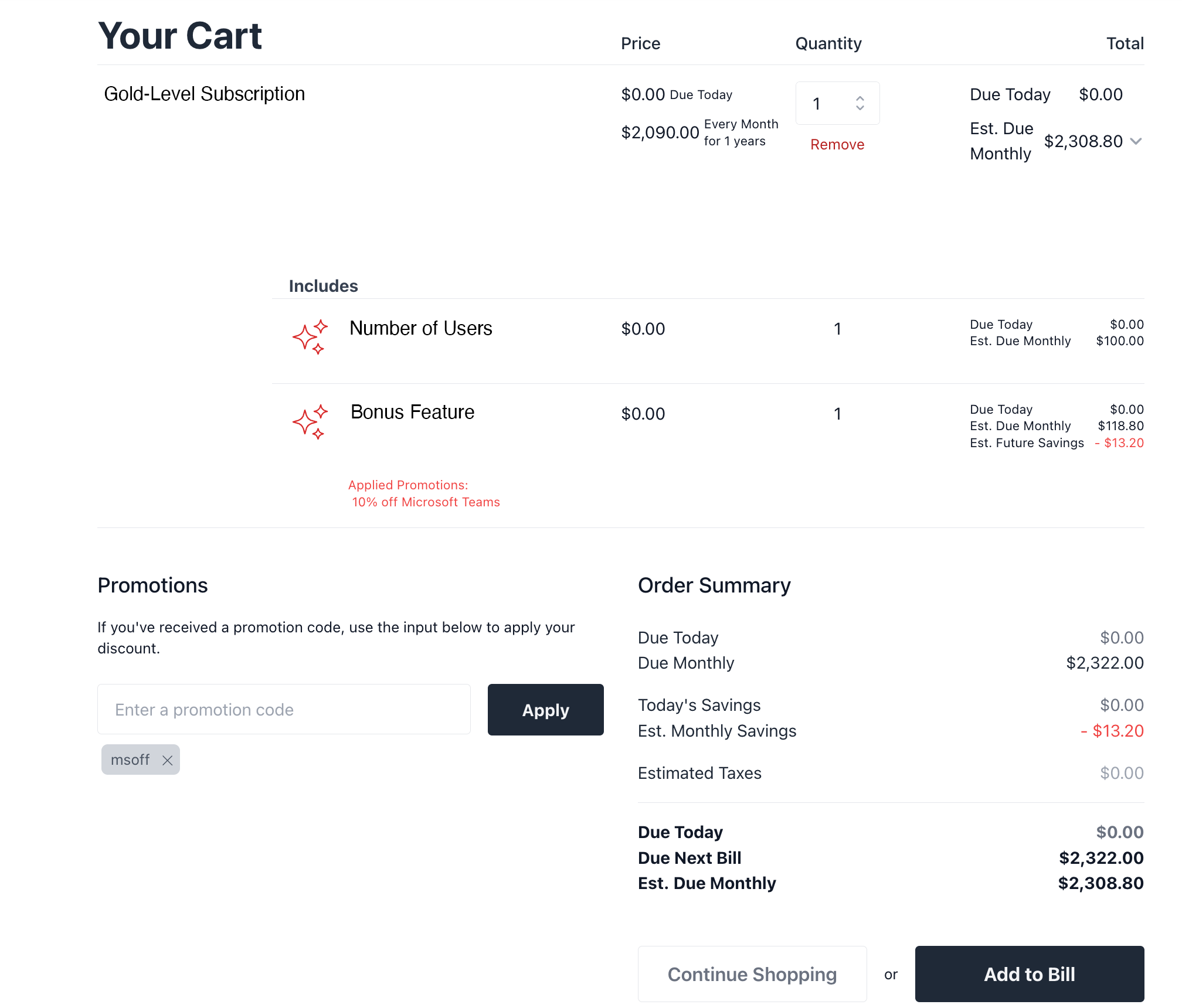
When trying to apply an offer to dependent items (add-ons), there are some notable configurations required:
Configure the root product (parent item):
In the Product Options section, edit the addOn product. Then in the Advanced Pricing section, ensure Discount Allowed is set as YES for the add-on/itemChoice.
Configure the offer:
Offer Target Type is Order Item.
Target Item Criteria includes the add-on item that is to be discounted.
In the Advanced section, the Apply discount to dependent items such as add-ons? is set as YES.
After this setup, the offer can be applied to the add-on:
Let’s say you have a "Buy 1 Subscription A Get 1 Subscription B Free" offer, and a customer signed up for both subscriptions. If Subscription A is cancelled, then the adjustment is removed from Subscription B automatically.
The overall flow looks like:
When the customer initiates cancel, a list of PendingSubscriptionItemAdjustmentRemoval objects are stored within the cancel cart’s internal attribute with the key "pendingSubscriptionItemAdjustmentRemovalDetails", which can be used to show in the front-end to convey what adjustments will be removed as part of the cancellation.
Once the cancellation cart is submitted, the removeAdjustmentForCancelledQualifierActivity workflow activity will be executed as part of the cancellation workflow, which will:
Do nothing if it’s a cancellation but the cancellation policy is CANCEL_AUTO_RENEWAL.
If it’s a cancellation and the policy is IMMEDIATE_CANCELLATION, it will first remove the subscription item adjustments, then generate billing events to account for the removed adjustments.
InitiateCancelSubscriptionHandler.buildPendingSubscriptionItemAdjustmentRemovalDetails
PendingSubscriptionItemAdjustmentRemoval
DefaultRemoveAdjustmentForCancelledQualifierActivity
SystemRemoveSubscriptionAdjustmentBillingEventGenerationHandler
Setup the offer with the relevant qualifier and target
Add both subscriptions in the same cart so that the offer will be applied
Submit cart for checkout
Once submitted, you can see the SubscriptionItemAdjustment on the target item
Cancel the qualifier subscription
Once submitted, you can see the SubscriptionItemAdjustment for the target item is removed and new billing events are generated to reflect the loss of adjustment
Reactivate the qualifier subscription
Once submitted, you can see the SubscriptionItemAdjustment is added back to the target item and new billing events are generated to reflect the addition of the adjustment
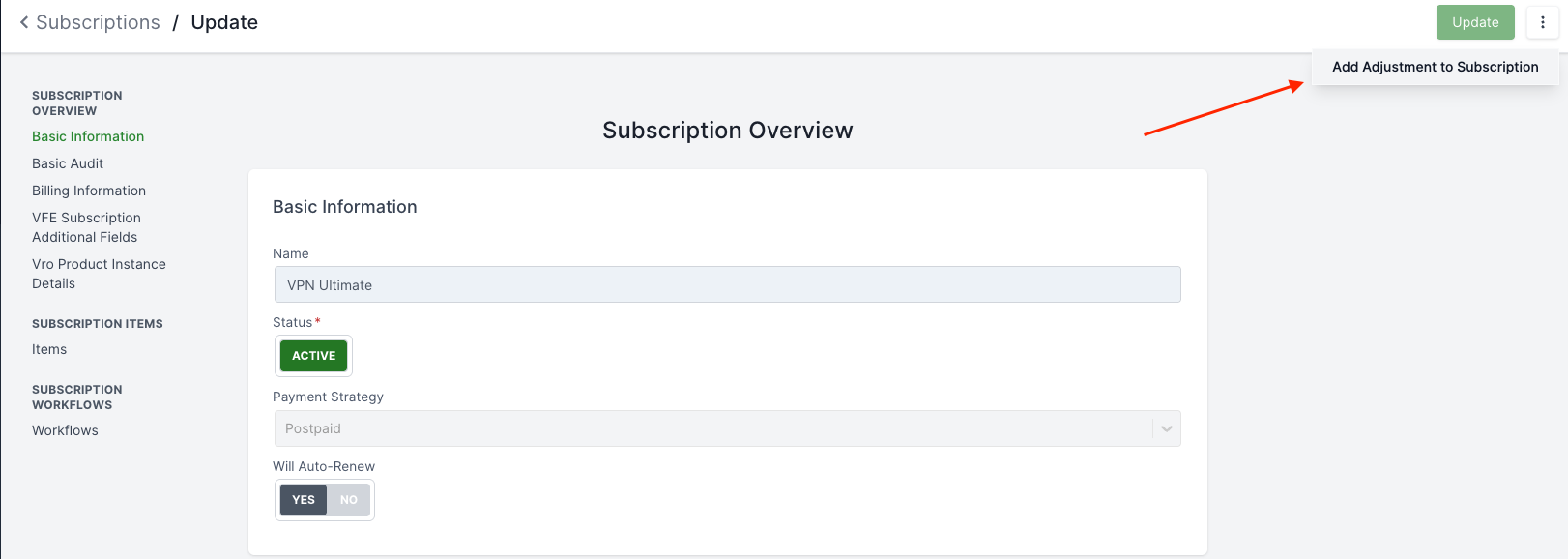
As an admin, you can also manually add an adjustment to an existing subscription. This can be done by clicking "Add Adjustment to Subscription" in the subscription detail view, then you can configure how the adjustment should be applied:
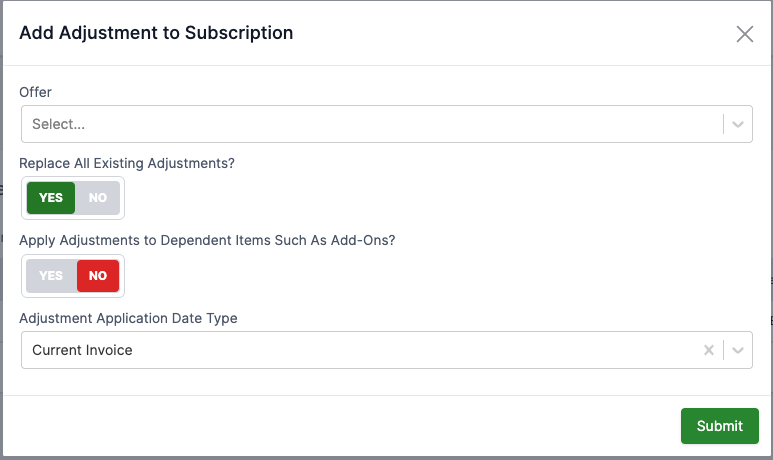
IMPORTANT: It is important to know that the offer criteria (e.g. qualifier & target rules, min/max subtotal, etc.) is NOT evaluated when going through this flow. Even if the offer wouldn’t have applied to the subscription under normal circumstances, the offer will still be forcibly applied when manually adding the adjustment.
SubscriptionOperationEndpoint.addAdjustmentToSubscription
SubscriptionAddAdjustmentModificationHandler
DefaultSubscriptionOfferService
CsrAddAdjustmentBillingEventGenerationHandler
Sign up for a subscription (with or without offer applied)
In the admin, go to the subscription details
Click "Add Adjustment to Subscription"
Configure how the adjustment should be applied
Once submitted, you can see the SubscriptionItemAdjustment is added to the subscription item and new billing events are generated to reflect the addition of the adjustment
Offers can now explicitly target a specific subscription flow (such as SUBSCRIPTION_CREATE, SUBSCRIPTION_EDIT, SUBSCRIPTION_UPGRADE, or SUBSCRIPTION_DOWNGRADE) or be applicable to ANY flow using the flow property on the Offer. The DefaultOfferCandidateService will filter out offers that do not match the current order flow, unless it is an existing offer that is already applied to the subscription (for example, retaining an existing discount when upgrading).
New fields activeSubscriptionRule and formerSubscriptionRule on SubscriptionDiscount allow limiting offers based on a user’s active and former subscriptions, effectively enabling "first time subscriber" offers. DefaultOfferCandidateService#filterOffersByOrderSubscriptionState evaluates these rules during offer processing to verify that the user has no existing subscriptions that would disqualify them from the offer.
For post-purchase subscription flows (like upgrades or edits), existing free trials or other subscription discounts are maintained. The ExistingOfferRef tracks how many periods have already been used, and DefaultOfferCandidateService (initializeSubscriptionRelatedOfferBasedOnExistingSubscription) accurately adjusts the new beginPeriod and endPeriod on the candidate offer to retain the remaining discount periods based on the current period of the subscription.
The rule builder for order-item criteria has been enhanced to support targeting by recurringPrice?.periodFrequency and recurringPrice?.periodType. This allows offers to target subscriptions based on specific billing frequencies (e.g., Monthly vs. Annually) using the DefaultRecurringPeriodType enum.
Broadleaf supports bundling multiple subscription products together using the MERCHANDISING_PRODUCT product type. This allows you to sell a package of distinct subscription services under a single unified offering, ensuring they share the same subscription lifecycle (i.e. billing frequency, payment strategy, and terms).
Consider a scenario where you want to sell a "Premium Streaming & Internet Service Bundle" that includes:
Premium Streaming Service (Product A)
Fiber Internet Service (Product B)
Instead of the customer adding these items individually to the cart, the Bundle guarantees they are purchased together with synchronized billing & terms.
The bundle itself is created as a Product with the productType set to MERCHANDISING_PRODUCT.
Key configuration points for the Merchandising Product:
isSubscription Flag: Set to true. This marks the bundle itself as a subscription.
Payment Strategy: The paymentStrategy (e.g., PREPAID or POSTPAID) is explicitly defined on the merchandising product. This is crucial because the bundle itself is not directly priced via PriceData; instead, its price is the sum of its parts. Declaring the payment strategy here ensures all child items conform to the bundle’s billing model.
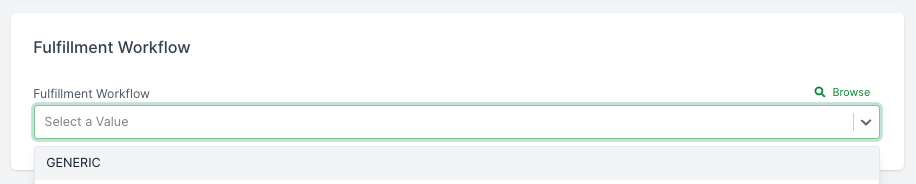
Fulfillment Workflow: You can specify a dedicated fulfillmentWorkflow on the bundle to route the entire package through a unified provisioning process instead of fulfilling the items separately.
Product Terms: The valid terms for the bundle (e.g., 2 Years) are defined on the merchandising product.
The actual services within the bundle are linked using ProductOption`s of type `ITEM_CHOICE.
For the Premium Streaming & Internet Service Bundle, you would configure two Item Choices:
Streaming Service Choice: Targets the "Premium Streaming Service" product with a minimumQuantity of 1.
Internet Service Choice: Targets the "Fiber Internet Service" product with a minimumQuantity of 1.
These item choices guarantee that when the bundle is added to the cart, the underlying services are automatically added as dependent cart items.
Because the bundle is a MERCHANDISING_PRODUCT, it does not have its own standalone PriceData with a base or recurring price. Its price is derived entirely from the dependent items.
When pricing the bundle, the system evaluates the PriceData for the underlying services ("Premium Streaming Service" and "Fiber Internet Service") using the terms and frequency selected for the bundle. During cart hydration, the DefaultCartItemCatalogInformationService explicitly overrides the paymentStrategy of the child items with the bundle’s paymentStrategy to ensure cohesive billing.