const isCancelAllowed = !!subscriptionWithItems.availableActions
  .find(action => action.actionType === DefaultSubscriptionActionType.CANCEL)
- v1.0.0-latest-prod
Cancelling a subscription allows a customer to opt out of access to the service and recurring billing. A cancellation action takes into account the subscription’s associated CancellationPolicy, which dictates whether cancellation is allowed, whether there are penalty fees, and whether the cancellation is applied immediately or delayed until the end of the billing period or contract terms.
Cancel - A customer-requested action to stop billing and turn off access to the service. For these requests, the business responds according to the cancellation policy, which may or may not allow the cancellation, apply additional fees, may charge full price for the remainder of terms, etc.
Cancellation Policy - The guidelines by which the business decides to handle the cancellation request. This can include anything from not allowing the cancellation, to scheduling the cancellation for a future date, to charging extra fees for cancelling.
Any number of cancellation policies can be active within the Broadleaf ecosystem, but each subscription only has one cancellation policy
Cancellation Strategy - The style of cancellation that is applied by the cancellation policy.
Immediate Cancellation - A style of cancellation that is applied immediately, immediately stopping billing (involving proration for the current period) & immediately revoking access.
Auto-Renewal Cancellation - A style of cancellation that is scheduled for the future, when the customer’s service would have automatically renewed. Until that future date, the customer continues to be billed according to the subscription’s billing frequency, and access to their services/goods is maintained.
If the subscription has terms (e.g. is under contract for 1 year), then an auto-renewal cancellation applies at the end of their current terms.
If the subscription does not have terms (e.g. is month-to-month), then an auto-renewal cancellation is applied at the end of the current billing period.
Grace period - A period of time during which the customer will receive preferential conditions for cancelling their subscription. For example, you may want to configure a 7-day period at the beginning their 1-year contract in which the customer can cancel without any penalty. Beyond that 7-day window, you may charge them for the remainder of their contract.
Turning Auto-Renewal On/Off
As an independent action outside of cancellation flows, you have the ability to turn auto-renewal on/off for a subscription. Turning auto-renewal off is essentially the same as an auto-renewal cancellation, in that the subscription is scheduled to cancel at the end of term or end of period. For more details on this, see the Subscription End‐of‐Terms Cancellations & Auto Renewal page.
Subscription Termination - A system-driven/business-driven action to terminate the subscription immediately (i.e. stop billing & revoke access immediately). With this action, there is no need to consult a cancellation policy, the current period’s pricing is prorated & access is revoked right away.
In the Broadleaf ecosystem today, this is only engaged to process scheduled cancellations.
As previously stated, Broadleaf allows you to create any number of CancellationPolicies, but each subscription only has one CancellationPolicy. During sign-up (the initial checkout of the subscription product), the CancellationPolicy is identified & a reference stored on the generated subscription (Subscription#cancellationPolicyRef). From there, this policy is referenced whenever a cancellation is requested & processed.
|
Important
|
It’s always important to have a default CancellationPolicy in case a targeted policy cannot be identified for a product. Out-of-the-box, we include a policy named "Default Cancellation Policy" (id: |
CancellationPolicies can either be directly associated with a product via Product#cancellationPolicyRef (holds CancellationPolicy#id), or indirectly using the policy’s matching rules (CancellationPolicy#policyRules) to target products by name, tag, category, billing frequency, term length, etc.
|
Note
|
If you wish to only target products directly for a CancellationPolicy, then set |
You’ll notice that each CancellationPolicy is embedded with two CancellationPolicyDetail objects representing prepaid vs postpaid policy details. This is done since cancellation decisions can be significantly different for prepaid vs postpaid subscriptions. For example, cancelling auto-renewal instead of cancelling immediately with prepaid subscriptions is preferred to avoid the need to refund the customer for access that they’ve already paid for.
Immediate Cancellation & Auto-Renewal Cancellation described above are our two out-of-box cancellation strategies.
With the different CancellationPolicyDetail objects for prepaid vs postpaid, you can choose to use different cancellation strategies for prepaid vs postpaid. We generally expect that auto-renewal cancellation will be used for prepaid subscriptions, while immediate cancellation will be used for postpaid subscriptions.
A cancel action’s pricing implications are informed by the following CancellationPolicy properties:
CancellationPolicyDetail#chargeStrategy (NO_CHARGE vs PRORATED) - describes how the customer will be charged for the current period. Note: These are charges due to the cancellation action. Keep in mind that the customer has already paid for the current period if the subscription uses a prepaid payment strategy.
PRORATED indicates that they will be charged for the time frame between the period start date & the cancellation date. We expect this value to often be used within the CancellationPolicy#postpaidPolicyDetail where CancellationPolicy#postpaidPolicyDetail#cancellationStrategy is IMMEDIATE.
NO_CHARGE indicates that they will not be charged any extra for the current period. We expect this value to often be used within the CancellationPolicy#prepaidPolicyDetail where CancellationPolicy#prepaidPolicyDetail#cancellationStrategy is CANCEL_AUTO_RENEWAL. In the case of prepaid, you’ve already paid for the current period, so there’s no need to charge for it again.
CancellationPolicyDetail#chargeForRemainderOfTerms - Whether the customer would be charged for the remainder of the subscription term (i.e. the remainder of their contract).
Note: This is only relevant if the cancellationStrategy is IMMEDIATE. If the cancellationStrategy is CANCEL_AUTO_RENEWAL, then the customer will already pay for the remainder of terms, but do so at the pace of the subscription’s billing frequency.
CancellationPolicyDetail#chargeFullPriceForRemainderOfTerms - Whether the customer would be charged full price (i.e. no discounts applied) when paying for the remainder of the subscription term.
CancellationPolicyDetail#chargeForPreviouslyReceivedDiscountAmounts - Whether the customer would be charged for any discount amounts that they received in previous subscription periods.
CancellationPolicyDetail#cancellationFeeProductId - Reference to a product that represents a fee for cancelling the subscription.
Each CancellationPolicyDetail has the ability to introduce a grace period.
This period can be configured to recur with each period, or be a one-time grace period after subscription sign-up.
For pricing, the grace period can provide a different charge strategy & different fees to the non-grace-period configuration.
The InitiateCancelSubscriptionHandler is responsible for handling the CANCEL action type.
When a user initiates a cancellation:
Validation:
Verifies that the requested CANCEL action is present in the subscription’s availableActions list.
Evaluates business rules and the CancellationPolicy to ensure the cancellation can proceed:
Confirms that the subscription has a cancellationPolicyRef defined.
Confirms that the referenced policy has a detail configuration matching the subscription’s paymentStrategy (e.g., PREPAID vs POSTPAID).
Checks the specific policy detail’s allowCancellation flag to verify that cancellation is permitted.
Cart Generation: Once validation is successful, the handler generates a new Cart populated with the subscription product, any applicable cancellation fees (as defined by the policy’s charge strategy), and prorated credits (if an immediate cancellation strategy is used).
Item Configuration: Similar to the Edit flow, each cart item is generated to mirror its corresponding SubscriptionItem (copying over quantity, paymentStrategy, etc.) and retains the EXISTING_SUBSCRIPTION_ITEM_ID internal attribute. However, unlike the Edit flow, these items also inject the IS_CANCELLATION_REQUEST flag and the CANCELLATION_POLICY_ID as internal attributes so the pricing engine can correctly evaluate prorations or credits. Additional standalone cart items may also be generated to account for any cancellation fee products.
It also injects attributes into the cart to coordinate the cancellation, such as:
CANCELLATION_POLICY_ID.
SUBSCRIPTION_PAYMENT_STRATEGY.
SUBSCRIPTION_PRICE_EXPIRATION_DATE_UTC.
PENDING_SUBSCRIPTION_ITEM_ADJUSTMENT_REMOVAL_DETAILS.
EXISTING_SUBSCRIPTION_DETAILS populated by SubscriptionModificationUtils to help map line items back to their original subscription items.
This generated cart is then returned to the caller to finalize the cancellation via checkout.
In the My Subscriptions UI, a list of available actions is provided on the SubscriptionWithItems object. The UI can check if the CANCEL action is present in the availableActions list:
const isCancelAllowed = !!subscriptionWithItems.availableActions
.find(action => action.actionType === DefaultSubscriptionActionType.CANCEL)If the action is permitted, a the Broadleaf demo UI renders a "Cancel" button. When clicked, it triggers the modifySubscription API using the CustomerClient or AccountClient, passing the CANCEL action type.
const response = await modifySubscription({
  subscriptionId: subscription.id,
  action: {
    actionType: DefaultSubscriptionActionType.CANCEL
  }
});After receiving the modifySubscription response, the Broadleaf demo UI extracts the newly generated cart ID (response.cart.id).
Because a cancellation may involve fees, the user is redirected directly to the checkout page to review the final cancellation details, and if needed, pay the fees.
When a cancellation is processed, the SubscriptionPricingService factors in the CancellationPolicy to determine the financial impact.
Prepaid Auto-Renewal Cancellation Example:
If a customer cancels a Prepaid subscription and the policy utilizes an CANCEL_AUTO_RENEWAL strategy with a NO_CHARGE charge strategy:
The amountDueNow is $0.
The customer retains access until the end of the current period, at which point the subscription ends. No refunds are issued.
Postpaid Immediate Cancellation Example:
If a customer cancels a Postpaid subscription and the policy utilizes an IMMEDIATE strategy with a PRORATED charge strategy:
The amountDueNow calculates the priorUnbilledAmount from the start of the period up to the cancellation date.
The customer must pay this amount to finalize the cancellation.
Cancellation Fees:
If the policy specifies a cancellationFeeProductId, InitiateCancelSubscriptionHandler adds that fee to the cancellation cart. The fee will be reflected in the amountDueNow.
When a customer completes checkout with the cancellation cart generated by the modification handler, the order is submitted. We leverage the cancel cart item’s fulfillmentWorkflow and subscription action flow of CANCEL to identify the correct fulfillment workflow to execute. See the following configuration to understand how the exact workflow is identified:
broadleaf:
  orderfulfillment:
    workflow:
      mapping:
        flows:
          match:
            fulfillmentTypeACancelWorkflow:
              - fulfillmentTypeA-CANCEL
            fulfillmentTypeBCancelWorkflow:
              - fulfillmentTypeB-CANCEL
            fulfillmentTypeCCancelWorkflow:
              - fulfillmentTypeC-CANCEL
Sample Configuration for a Cancel Workflow:
broadleaf:
  workflow:
    client:
      flows:
        fulfillmentTypeACancelWorkflow:
          description: Subscription Cancellation Workflow for Type-A Subscriptions
          historical-reset-enabled: true
          retry-enabled: true
      steps:
        fulfillmentTypeACancelWorkflow:
          prepareSubscriptionFulfillmentActivity:
            admin-selectable: true
            decisions:
              ok: subscriptionModificationActivity
          subscriptionModificationActivity:
            admin-selectable: true
            decisions:
              immediateCancel: subscriptionBillingEventGenerationActivity
              cancelAutoRenewal: releaseSubscriptionLockActivity_ar
          # cancel auto renewal branch
          releaseSubscriptionLockActivity_cancelAR:
            admin-selectable: true
            decisions:
              ok: startChangeAutoRenewalWorkflowActivity
          startChangeAutoRenewalWorkflowActivity:
            admin-selectable: true
            decisions:
              ok: fulfillmentStatusFinalizationActivity_cancelAR
          fulfillmentStatusFinalizationActivity_cancelAR:
            admin-selectable: true
          # immediate cancellation branch
          subscriptionBillingEventGenerationActivity:
            admin-selectable: true
            decisions:
              ok: removeAdjustmentForCancelledQualifierActivity
          removeAdjustmentForCancelledQualifierActivity:
            admin-selectable: true
            decisions:
              ok: myCustomProvisioningActivityForFulfillmentTypeA
          myCustomProvisioningActivityForFulfillmentTypeA:
            admin-selectable: true
            decisions:
              ok: releaseSubscriptionLockActivity
          releaseSubscriptionLockActivity:
            type: releaseSubscriptionLockActivity
            admin-selectable: true
            decisions:
              ok: fulfillmentStatusFinalizationActivity
          fulfillmentStatusFinalizationActivity:
            admin-selectable: true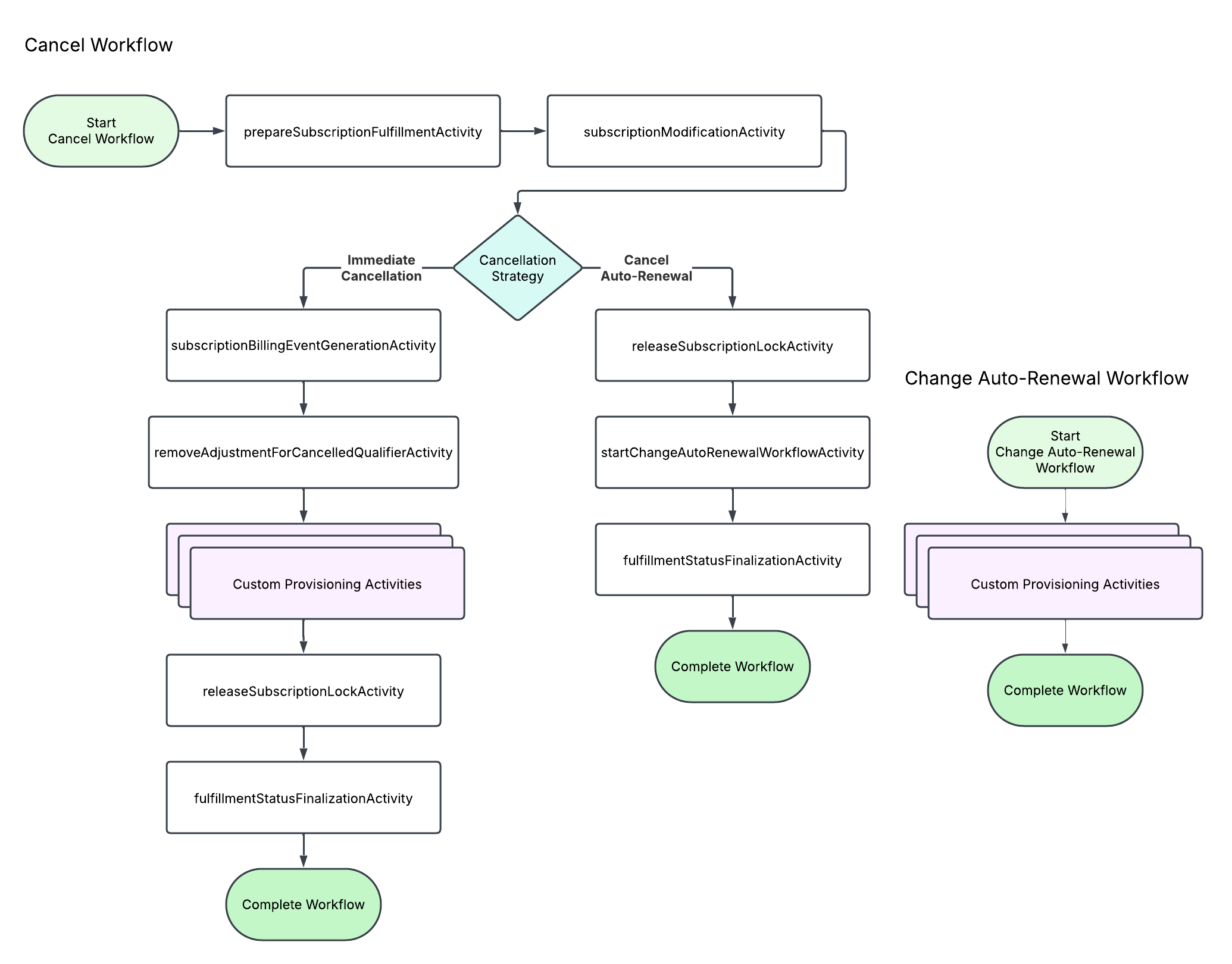
To help digest the possible paths through this workflow, lets consider the following scenarios…
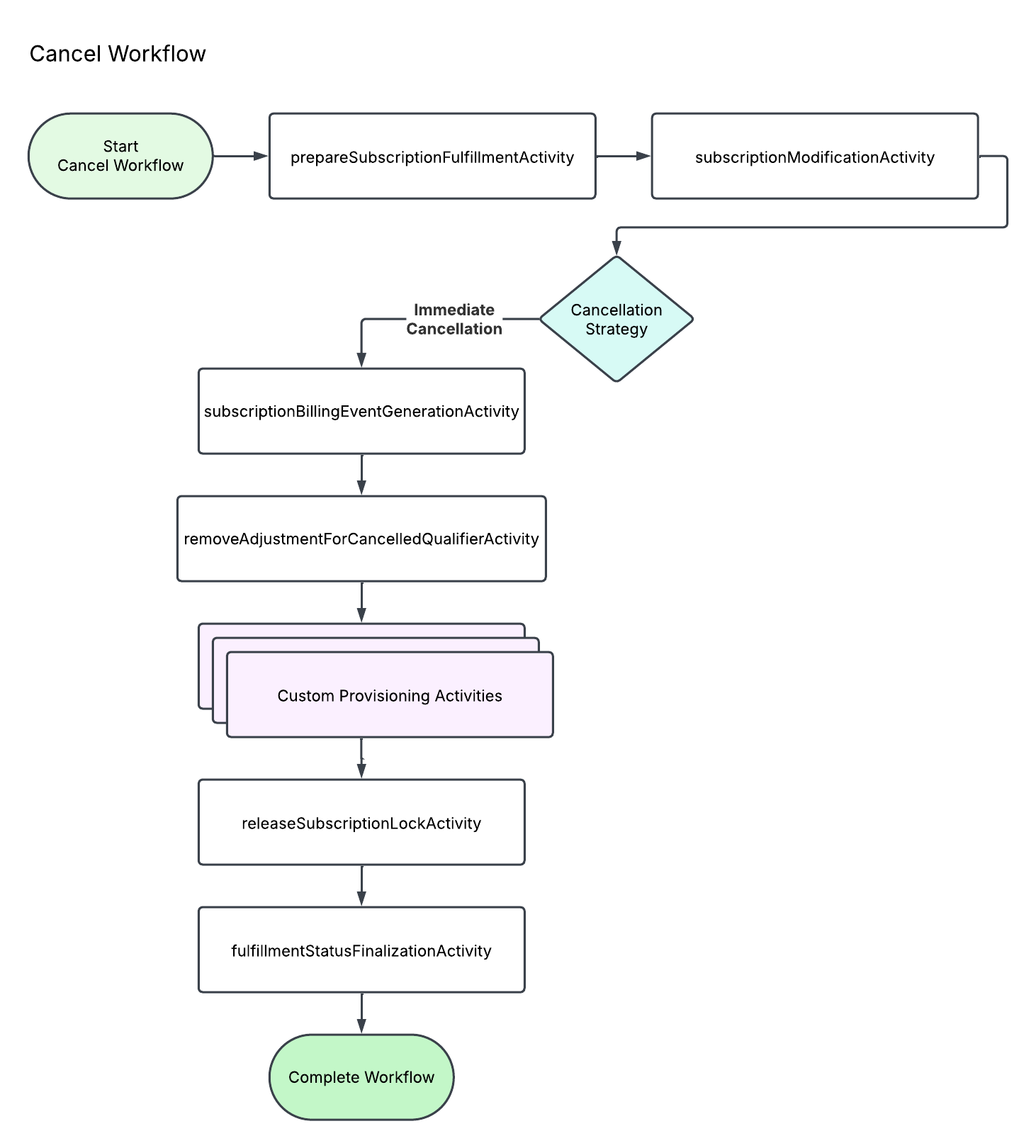
Initial Workflow Context Parameters
Order.id
Order.submitDate
OrderFulfillment.id
Subscription.id
LockStatus.lockId (the subscription lock)
Application.id
Tenant.id
subscriptionActionFlow (CREATE, EDIT, UPGRADE, DOWNGRADE, CANCEL, etc.)
OrderFulfillment.fulfillmentWorkflow (fulfillmentTypeA)
customerTimezone (if applicable)
Workflow Activity Descriptions
prepareSubscriptionFulfillmentActivity (broadleaf-subscription-operation-services-workflow) - Makes a production update to the subscription, setting Subscription#subscriptionStatus to FULFILLMENT_IN_PROCESS.
subscriptionModificationActivity (broadleaf-subscription-operation-services-workflow) - Delegates to the CancelSubscriptionModificationHandler since the action flow is CANCEL. Gathers the subscription’s cancellation policy and evaluates the policy’s cancellation strategy. In this scenario, it identifies that an immediate cancellation is required (CancellationPolicyDetail#cancellationStrategy). Makes a sandbox update to the subscription, updating its status to CANCELLED. This activity returns immediateCancel as its responseState, causing the workflow to branch into the Immediate Cancellation path.
subscriptionBillingEventGenerationActivity (broadleaf-subscription-operation-services-workflow) - Delegates to the SubscriptionCancelBillingEventGenerationHandler. All charges for the subscriptions existing BillingEvents following the cancellation date are negated.
removeAdjustmentForCancelledQualifierActivity (broadleaf-subscription-operation-services-workflow) - Inspects the PENDING_SUBSCRIPTION_ITEM_ADJUSTMENT_REMOVAL_DETAILS cart attribute to remove any subscription item adjustments that were applied due to the canceled subscription acting as a qualifier for an offer on another subscription.
myCustomProvisioningActivityForFulfillmentTypeA - An example of a custom workflow activity that might be executed for a specific fulfillment type to de-provision a service.
releaseSubscriptionLockActivity_immediate (broadleaf-subscription-operation-services-workflow) - The subscription lock is released & all subscription sandbox updates are applied to the production record.
fulfillmentStatusFinalizationActivity (broadleaf-order-operation-services-workflow) - Updates the OrderFulfillment status to indicate that fulfillment has completed (e.g., setting it to FULFILLED).
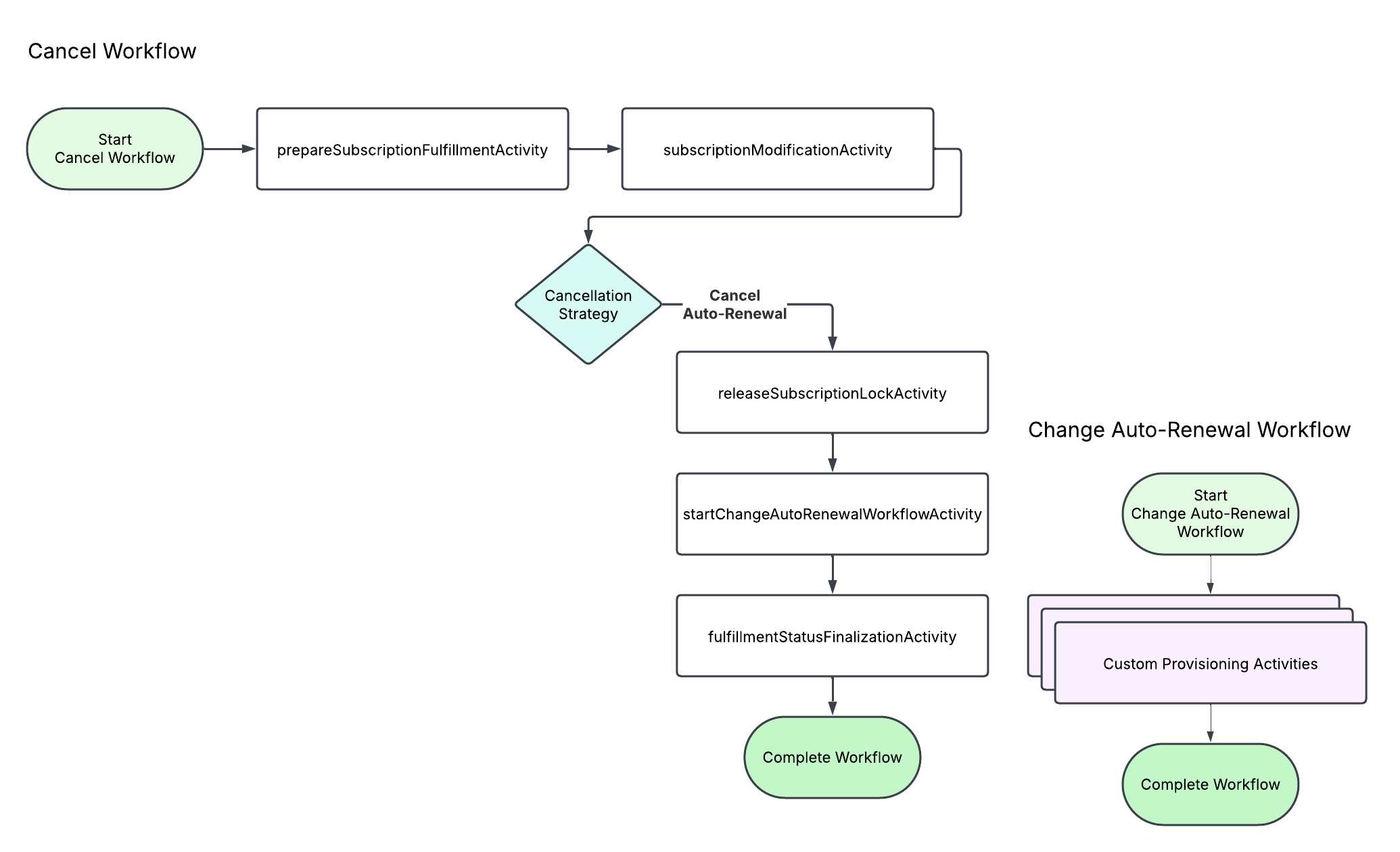
Initial Workflow Context Parameters
Order.id
Order.submitDate
OrderFulfillment.id
Subscription.id
LockStatus.lockId (the subscription lock)
Application.id
Tenant.id
subscriptionActionFlow (CREATE, EDIT, UPGRADE, DOWNGRADE, CANCEL, etc.)
OrderFulfillment.fulfillmentWorkflow (fulfillmentTypeA)
customerTimezone (if applicable)
Workflow Activity Descriptions
prepareSubscriptionFulfillmentActivity (broadleaf-subscription-operation-services-workflow) - Makes a production update to the subscription, setting Subscription#subscriptionStatus to FULFILLMENT_IN_PROCESS.
subscriptionModificationActivity (broadleaf-subscription-operation-services-workflow) - Delegates to the CancelSubscriptionModificationHandler. Gathers the subscription’s cancellation policy and evaluates the policy’s cancellation strategy. In this scenario, it identifies that an auto-renewal cancellation is required (CancellationPolicyDetail#cancellationStrategy). Makes a sandbox update to the subscription, setting the following fields: Subscription#autoRenewalEnabled to false, Subscription#subscriptionNextStatus to CANCELLED, and Subscription#nextStatusChangeDate to the Subscription#endOfTermDate if present, otherwise to the Subscription#nextBillDate. This activity returns cancelAutoRenewal as its responseState, causing the workflow to branch into the Cancel Auto-Renewal path.
releaseSubscriptionLockActivity (broadleaf-subscription-operation-services-workflow) - The subscription lock is released & all subscription sandbox updates are applied to the production record.
startChangeAutoRenewalWorkflowActivity (broadleaf-subscription-operation-services-workflow) - This activity starts the change auto-renewal workflow to notify 3rd party systems of the change in intention to auto-renew. The workflow context parameters are copied from the cancel workflow, but the subscriptionActionFlow is changed to CHANGE_AUTO_RENEWAL & autoRenewalEnabled is declared as false.